﻿<%@ Page Title="Cloud Storage - Private Cloud for Your Enterprise" Language="C#"
    AutoEventWireup="true" CodeBehind="TechWhitePaper.aspx.cs" Inherits="cloudenterprise._Default"
    MasterPageFile="Site.master" %>

<asp:Content ID="Content1" runat="server" ContentPlaceHolderID="ContentTitle">
    CentreStack (Gladinet Cloud Enterprise) Technical White Paper
</asp:Content>

<asp:Content ID="Content2" runat="server" ContentPlaceHolderID="SEOBlock">
    <meta name="keywords" content="enterprise dropbox alternative, enterprise dropbox replacement, owncloud alternative, cloud storage, private cloud, cloud enterprise, enterprise cloud,  self-hosted dropbox, enterprise dropbox, owncloud alternative, cloud desktop, cloud gateway, cloud agent, Cloud computing environment, map drive, backup, online backup,  online storage, cloud storage, cloud storage client, amazon s3, skydrive, HP docs, HP picasa, emc atmos, synaptic storage, nirvanix, mezeo, Peer1 CloudOne, HP Storage for Developer" />
    <meta name="description" content="CentreStack (GLADINET cloud enterprise) provides self-hosted cloud storage solutions that is alternative to Dropbox and OwnCloud, with backup, access, sync, integration, connect, identity & control management. It is a self-hosted enterprise dropbox alternative and enterprise dropbox replacement solution. This is a technical whitepaper covering the technical background of the solution." />
</asp:Content>
<asp:Content ID="Content" runat="server" ContentPlaceHolderID="MainContent">
    <a name='teams'></a>
    <table width="860" align="center" border="0" cellspacing="0" cellpadding="0" style="padding: 0px;">
        <tr>
            <td>
                &nbsp;
            </td>
        </tr>
        <tr>
            <td class="checkout" width="860" style="padding: 16px;">
                <a name='promo'></a>
                <table width="860" border="0" align="center" cellpadding="0" cellspacing="0" style="margin: 0px;
                    padding: 0px;">
                    <tr>
                        <td style="text-align: left;">
                            <span class="headsubtitle1">Technical White Paper</span>
                        </td>
                    </tr>
                    <tr>
                        <td style="vertical-align: top; border-top: 0 solid #d0d0d0; text-align: center;">
                            <h1>
                                CentreStack</h1>
                        </td>
                    </tr>
                    <tr>
                        <td style="vertical-align: top; border-top: 0 solid #d0d0d0; text-align: center;
                            padding-top: 6px; padding-bottom: 16px;">
                            <span class="headsubtitle1"></span>
                        </td>
                    </tr>
                    <tr>
                        <td style="padding-left: 0px; padding-top: 16px; padding-bottom: 16px; font-size: 16px;">
                            <div class="toc" style="float: left;">
                                <b style="margin-left: 8px;">Table of Contents</b><br />
                                <ul style="list-style-type: circle;">
                                    <li><a class="normal" href="#intro">Introduction</a></li>
                                    <li><a class="normal" href="#term">Terminology</a></li>
                                    <li><a class="normal" href="#depend">Dependency Components</a></li>
                                    <li><a class="normal" href="#hardware">Recommended Hardware Specification</a></li>
                                    <li><a class="normal" href="#capacity">Capacity Planning</a></li>
                                    <li><a class="normal" href="#tenant">Tenant Consideration</a></li>
                                    <li><a class="normal" href="#actived">Active Directory Integration</a></li>
                                    <li><a class="normal" href="#storage">Storage Consideration</a></li>
                                    <li><a class="normal" href="#backup">Backup CentreStack</a></li>
                                    <li><a class="normal" href="#deploy">Deployment Scenarios</a></li>
                                </ul>
                                <b style="margin-left: 8px;">Download White Paper</b><br />
                                <a href="techwhitepaper.pdf">
                                    <img src="images/reader.png" border="0" /></a>
                            </div>
                            <a name="intro"></a>
                            <h2>
                                Introduction
                            </h2>
                            <p>
                                CentreStack (Gladinet Cloud Enterprise) provides value-added services on top of cloud storage services such
                                as those from OpenStack, Amazon S3 and its compatibles. The value-added services
                                can be summarized into Backup, Access, Sync and Share, Identity, Control and Collaboration
                                (BASIC).
                            </p>
                            <p>
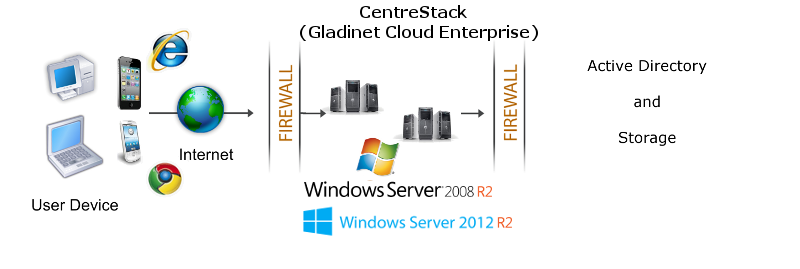
                                CentreStack is a cluster of web services built on top of the Microsoft
                                Web Platform. It provides the BASIC online storage value-add services for user end
                                point devices like PCs, File Servers, Web Browsers, and Mobile Devices.
                            </p>
                            <p>
                                Those services can be deployed in flexible combinations to meet different needs.
                                For example, a storage focused use case requires more storage nodes, while one with
                                more collaboration may have better performance with more worker nodes. The cluster
                                of services can also be deployed on a single node, which is the smallest deployment
                                unit.
                            </p>
                            <img src="images/dmz.png" /><br />
                            <p>
                                CentreStack supports various deployment scenarios based on your needs.
                                Please reference the “CentreStack White Paper” for a high level architectural
                                overview of the system, and possible deployment scenarios.
                            </p>
                            <p>
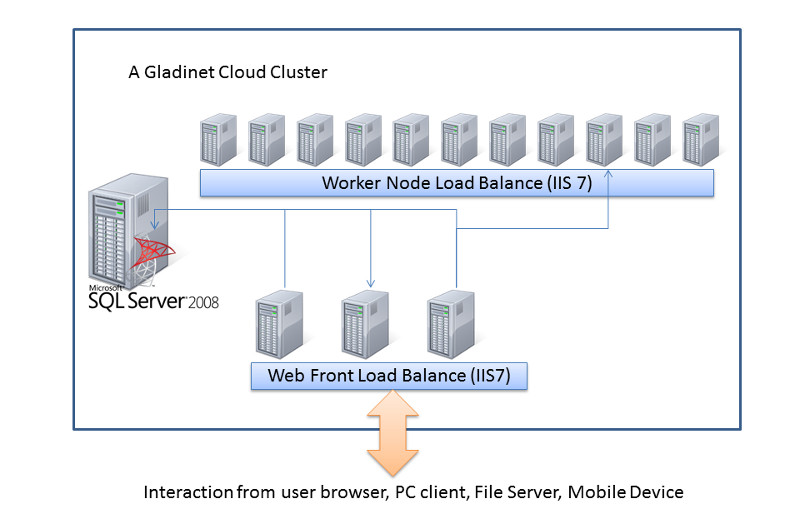
                                There are three different types of machines (or Virtual Machine). In the smallest
                                deployment unit, the three different logical nodes can co-exists in one single machine.
                            </p>
                            <ul>
                                <li>Web Front Node
                                    <p>
                                        The Account Management, Sign-in and Load-balancing services will be installed on
                                        this physical machine. Depending on the load, you may need 1 to N such nodes. This is primarily for load 
                                        balancing purpose. If you have your own load balancer, you can skip web front nodes. 
                                    </p>
                                </li>
                                <li>Worker Node
                                    <p>
                                        This node will contain services like Web Browser Based File Manager, Storage Service
                                        Connectors, and etc. Again, additional nodes can be added as the load increases.
                                        Worker nodes are designed to be stateless to facilitate adding nodes on demand to support load increase.
                                    </p>
                                </li>
                                <li>Database Node
                                    <p>
                                        Database contains persistent information for the system, such as user name, email, mostly static information.
                                        There is also dynamic information such as file change log, audit trace and etc. 
                                    </p>
                                </li>
                            </ul>
                            <img src="images/gclouddia3.jpg" />
                            <p>
                                The remainder of this document describes components within this CentreStack
                                cluster diagram.</p>
                            <a name="term"></a>
                            <h2>
                                Terminology
                            </h2>
                            <p>
                                <b>Master Admin</b> - In this guide, we refer to the admin user as the user that
                                manages the whole Gladinet Cloud Cluster package. The Master Admin is the very first
                                user that registered with the CentreStack. Typically it is the user
                                who installed the CentreStack.
                            </p>
                            <p>
                                <b>Tenant User</b> - These are the users who actually use the product, but are the
                                admin for their team. This is the very first team account user. Usually the Tenant
                                User is created by Master Admin. Tenant Users are similar to users who sign up for
                                the Gladinet Cloud service directly from Gladinet.
                            </p>
                            <p>
                                <b>Team User</b> – Team user is a user under a specific Tenant. Team users are created
                                by the Tenant User.
                            </p>
                            <p>
                                <b>Access Clients</b> – CentreStack contains various access clients,
                                including Web Browser Based File Manager, Windows Desktop Client, Windows Server
                                Client and Mobile Applications. Through the access clients, end user sees the BASIC
                                value-add services on top of raw storage services. The discussion of the access
                                clients are outside the scope of this technical white paper.
                            </p>
                            <a name="depend"></a>
                            <h2>
                                Dependency Components
                            </h2>
                            <p>
                                CentreStack is built on top of Microsoft Web Platform, including Internet
                                Information Server (IIS), .Net Framework 4.5, ASP.NET and SQL Server or SQL Server
                                Express.
                            </p>
                            <h3>
                                SQL Server</h3>
                            <p>
                                SQL Server or SQL Server Express is used to store static configuration information,
                                such as user name, email, storage configuration, files and folders sharing information
                                and etc. It is recommended the SQL Server has daily backup since it holds configuration
                                information for the service to run properly.
                            </p>
                            <h3>
                                .Net Framework 4.5</h3>
                            <p>
                                CentreStack is built with .Net Framework 4.5
                            </p>
                            <h3>
                                ASP.NET</h3>
                            <p>
                                CentreStack web browser user interface is written in ASP.NET, HTML
                                and Javascript.
                            </p>
                            <h3>
                                Internet Information Server
                            </h3>
                            <p>
                                CentreStack is hosted inside Internet Information Server(IIS). It
                                provides brokerage functionalities between the Access Clients and the backend storage.
                                It is also a value-add layer on top of the backend storage.
                            </p>
                            <a name="hardware"></a>
                            <h2>
                                Recommended Starting Hardware Specification
                            </h2>
                            <ul>
                                <li>Memory: 8GB</li>
                                <li>Hard Drive: 200G</li>
                                <li>64-bit platform</li>
                                <li>Windows 2012 R2 or Windows 2012</li>
                                <li>CPU: Intel x64 </li>
                                <li>vCPU: 4 (for Physical Machine, 4-core CPU)</li>
                                <li>(This is similar to an Amazon EC2 C3.xlarge specification)</li>
                            </ul>
                            <p>
                                (NOTE: It is recommended using Virtual Machine. Windows 2008 R2 is also supported while we recommend Windows 2012 R2)</p>
                            <a name="capacity"></a>
                            <h2>
                                Capacity Planning
                            </h2>
                            <p>
                                For concurrent user counts
                                below 1000 (named user ~ 5000) , a single CentreStack server is enough. In
                                this case, you will install the CentreStack Server all-in-one in one
                                single physical or virtual machine. The default CentreStack installer
                                will install all the components in one machine.
                            </p>
                            <p>
                                For concnrrent user counts
                                above 1000 (or named user ~ 5000) , it is recommended to have SQL Server node in a single physical/virtual
                                machine. The rest of the worker nodes will share the load for the users in a capacity
                                of 1000 con-current-user each. In this case, it is recommended using virtual machine for each worker
                                node and use a wild card SSL certificate for each worker node. Con-current user is defined as users accessing the system 
                                in the same 10-second time window. 1000 con-current user is around 5000 - 10000 named user depending on the usage pattern.
                            </p>
                            <a name="tenant"></a>
                            <h2>
                                Tenant Consideration</h2>
                            <p>
                                CentreStack comes with two different packages, one is for single business,
                                and the other is for service provider.
                            </p>
                            <ul>
                                <li>Single Business – Single Active Directory Integration, Single Tenant </li>
                                <li>Service Provider – Multiple Active Directory Integration, Multiple Tenants </li>
                            </ul>
                            <a name="actived"></a>
                            <h2>
                                Active Directory Integration</h2>
                            <p>
                                There are two user management modes in CentreStack.
                            </p>
                            <p>
                                In the first mode, the default user manager mode, users are manually created, and
                                active directory users are imported. In this mode, it is possible to have non-Active
                                Directory users and Active Directory users.
                            </p>
                            <p>
                                In the second mode, the active directory mode, there is no need to create or import
                                user and you can use native Active Directory groups. However, you can’t have non-Active
                                Directory users.
                            </p>
                            <a name="storage"></a>
                            <h2>
                                Storage Consideration</h2>
                            <p>
                                In the CentreStack system, for each tenant, there is one mandatory
                                primary storage and there can be multiple optional auxiliary storage services.
                            </p>
                            <p>
                                If you setup the CentreStack in an Amazon EC2 environment, most of
                                the time, the primary storage is an Amazon S3 bucket.
                            </p>
                            <p>
                                If you setup the CentreStack on-premise, the primary storage can be
                                your file server storage and the auxiliary storage can be other cloud storage services.
                            </p>
                            <a name="backup"></a>
                            <h2>
                                Backup CentreStack</h2>
                            <p>
                                Only the SQL Server database contains persistent configuration information. All
                                the design is stateless and replaceable. In a disaster recovery scenario, as soon
                                as SQL Server is restored, other worker nodes can be re-installed and start working
                                immediately.
                            </p>
                            <a name="deploy"></a>
                            <h2>
                                Deployment Scenarios</h2>
                            <h3>
                                Private On-premise</h3>
                            <p>
                                You can prepare a Windows 2008 Service Pack 2 or R2 server, or a Windows 2012 server and install Gladinet
                                Cloud Enterprise. In this scenario, typically Active Directory is at the same site
                                and primary storage is file server storage or NAS storage.
                            </p>
                            <h3>
                                Private Off-Premise</h3>
                            <p>
                                Normally a managed service provider(MSP) is helping you manage all your IT services,
                                such as hosted exchange server, hosted file server and etc. You can ask the same
                                managed service provider installing the CentreStack for you. It is
                                off-premise but managed by the MSP in their data center.
                            </p>
                            <h3>
                                Virtual Private Cloud</h3>
                            <p>
                                In this deployment scenario, you would deploy the CentreStack solution
                                in a virtual private cloud environment such as Amazon EC2. CentreStack
                                is also available in the form of AMI image to facilitate creation of EC2 instances.
                                In this deployment scenario, typical primary storage connection is to the Amazon
                                S3 storage.

                            </p>
                            <a href="Signup.aspx">
                                <img src="../images/btn_signup.gif" border="0" /></a>&nbsp;&nbsp;
                            <h2>
                                See Also</h2>
                            <p>
                                <a href="SyncShare.aspx">Installable Enterprise Sync &amp; Share Solution</a>
                            </p>
                            <p>
                                <a href="OnlineAccess.aspx">Secure Online Access to Your Private Cloud</a>
                            </p>
                            <p>
                                <a href="ActiveDirectory.aspx">Access Cloud Storage with Active Directory Identities</a>
                            </p>
                            <p>
                                <a href="CloudSolutionForMSP.aspx">Cloud Sync &amp; Share, Team Collaboration Solution
                                    for Managed Service Provider</a>
                            </p>
                            <p>
                                <a href="HomeDirectoryOnline.aspx"></a>
                            </p>
                        </td>
                    </tr>
                </table>
            </td>
        </tr>
        <tr>
            <td>
                <table>
                    <tr>
                        <td>
                            &nbsp;
                        </td>
                    </tr>
                </table>
            </td>
        </tr>
        <tr>
            <td>
            </td>
        </tr>
    </table>
    <table>
        <tr>
            <td>
                &nbsp;
            </td>
        </tr>
    </table>
    <table width="860" border="0" align="center" cellpadding="0" cellspacing="0">
        <tr>
            <td colspan="2">
                &nbsp;
            </td>
        </tr>
        <tr>
            <td class="style13">
                <span>Additional questions?&nbsp; Contact Gladinet Support at support@gladinet.com.</span>
            </td>
        </tr>
    </table>
</asp:Content>
