﻿<%@ Page Language="C#" AutoEventWireup="true" CodeBehind="NovellFilrAlternativeReplacement.aspx.cs"
    Inherits="cloudenterprise.SuccessStory" MasterPageFile="Site.master" %>

<asp:Content ID="Content1" runat="server" ContentPlaceHolderID="ContentTitle">
    Success Stories
</asp:Content>
<asp:Content ID="Content2" runat="server" ContentPlaceHolderID="SEOBlock">
    <meta name="keywords" content="OwnCloud, OwnCloud alternative, Novell Filr, cloud storage, private cloud, cloud enterprise, enterprise cloud,  self-hosted dropbox, self-hosted owncloud, online storage, cloud storage, cloud storage client" />
    <meta name="description" content="CentreStack (GLADINET cloud enterprise) provides cloud storage related solutions for enterprise to self-host a Novell Filr alternative replacement solution, file sync and share solution." />
</asp:Content>
<asp:Content ID="Content" runat="server" ContentPlaceHolderID="MainContent">
    <style type="text/css">
        .content
        {
            padding-bottom: 12px;
            vertical-align: top;
        }
        .ctitle
        {
            vertical-align: top;
            background-color:#e0e0e0;
        }
    </style>
    <a name='teams'></a>
    <table width="860" align="center" border="0" cellspacing="0" cellpadding="0" style="padding: 0px;">
        <tr>
            <td>
                &nbsp;
            </td>
        </tr>
        <tr>
            <td class="checkout" width="860" style="padding: 16px;">
                <a name='promo'></a>
                <table width="860" border="0" align="center" cellpadding="0" cellspacing="0" style="margin: 0px;
                    padding: 0px;">
                    <tr>
                        <td style="vertical-align: top; border-top: 0 solid #d0d0d0; text-align: center;">
                            <h1>
                                Customer Success Stories</h1>
                        </td>
                    </tr>
                    <tr>
                        <td style="vertical-align: top; border-top: 0 solid #d0d0d0; text-align: center;
                            padding-top: 6px; padding-bottom: 16px;">
                            <span class="headsubtitle1">A few examples of private installations across the globe</span>
                        </td>
                    </tr>
                    <tr>
                        <td style="padding-left: 0px; padding-top: 16px; padding-bottom: 16px; font-size: 16px;">
                            <div class="toc" style="float: left;">
                                <b style="margin-left: 8px;">Some Typical Use Cases</b><br />
                                <ul style="list-style-type: circle;">
                                    <li><a class="normal" href="#intro">Managed Service Provider</a></li>
                                    <li><a class="normal" href="#problem">Single Tenant Private Cloud</a></li>
                                    <li><a class="normal" href="#gladinet">Multi Tenant Private Cloud</a></li>
                                    <li><a class="normal" href="#imp">Small to Medium Sized Business</a></li>
                                    <li><a class="normal" href="#summary">Summary</a></li>
                                </ul>
                                <b style="margin-left: 8px;">Picture Gallery Links</b>
                                <ul style="text-align: left; list-style-type: circle;">
                                    <li><a class="normal" href="features/msp-enterprise-web-access.aspx">Web Browser Access</a></li>
                                    <li><a class="normal" href="features/msp-enterprise-windows-desktop.aspx">Windows Desktop
                                        Access</a></li>
                                    <li><a class="normal" href="features/msp-enterprise-macosx.aspx">Mac OS X Desktop Access</a></li>
                                    <li><a class="normal" href="features/msp-enterprise-mobile-access.aspx">Mobile Access</a></li>
                                    <li><a class="normal" href="features/msp-enterprise-ios-phone-pad.aspx">iOS Access</a></li>
                                    <li><a class="normal" href="features/msp-enterprise-android.aspx">Android Access</a></li>
                                    <li><a class="normal" href="features/msp-enterprise-windows-phone.aspx">Windows Phone
                                        8 Access</a></li>
                                    <li><a class="normal" href="features/msp-enterprise-windows-store-app.aspx">Windows
                                        Surface (RT) Access</a></li>
                                    <li><a class="normal" href="features/msp-enterprise-file-server.aspx">File Server Access</a></li>
                                    <li><a class="normal" href="features/msp-enterprise-online-collaboration.aspx">Online
                                        Collaboration</a></li>
                                    <li><a class="normal" href="features/msp-enterprise-file-and-folder-share.aspx">File
                                        and Folder Share</a> </li>
                                    <li><a class="normal" href="features/msp-enterprise-file-server-migration.aspx">Migrate
                                        File Server</a> </li>
                                    <li><a class="normal" href="features/msp-enterprise-unify-branch-office.aspx">Unify
                                        Branch Office File Structure</a></li>
                                </ul>
                                <b style="margin-left: 8px;">Video Gallery Links</b>
                                <ul style="text-align: left; list-style-type: circle;">
                                    <li><a class="normal" href="features/VideoGallery.aspx">Video Links</a></li>
                                </ul>
                                <a style="margin-left: 8px;" href="Signup.aspx">
                                    <img src="../images/tryitbtn.jpg" border="0" /></a>
                            </div>

                            <a name="nsd"></a>
                            <h2>
                                Chris Kacoroski, Northshore School District

                            </h2>
                            <p>
                                <img src="features/images/access.png" style="float: left; padding-right: 8px; padding-bottom: 8px;" />
                                "We had 6800 PCs and Macs that needed reliable remote access to our file servers. Gladinet Cloud Enteprise
                                allowed us to solve that problem and create a secure, private file sharing solution for our 23,000 faculty
                                and students who were struggling with email and USB drives. The transition has been completely seamless and
                                I am very impressed!"
                            </p>
                            <a name="msp"></a>
                            <h2>
                                &nbsp;</h2>
                            <h2>
                                Rob Bosch, iPremise
                            </h2>
                            <p>
                                <img src="https://www.ipremise.net/img27.jpg" style="float: left; padding-right: 8px; padding-bottom: 8px;" />

                                "We feel pretty good about where the product is headed and the new features. The management capabilities
                                now are pretty strong and definitely a good fit for an enterprise operation. We just rolled out a 70-user
                                implementation that went really well. We used it to replace a SharePoint site. We have another customer that
                                has several sites that we’ve moved to the cloud, replacing their SharePoint/Dropbox solution. I have several
                                customers expecting to move away from using our onsite server package and moving everything to the cloud. We
                                also have some larger, multi-site implementations which worked exactly as I planned. We save money on server
                                replacements and they get a great solution." </p>
                            <a name="yhman"></a>
                            <h2>
                                Ed Carter, YHMAN
                            </h2>
                            <p>
                                "YHMAN provides a Shared Community Cloud service in the UK for the University and College educational sector.
                                We had an urgent need to provide a secure file sharing and cloud access platform. CentreStack
                                has enabled us to offer each university tenancy access to our cloud storage service while authenticating users
                                against the appropriate university active directory and allowing them to collaborate easily."
                            </p>
                            <a name="smb"></a>
                            <h2>
                                Ed McGuian, Merit Group</h2>
                            <p>
                            "I was asked to provide the equivalent to a file server for different departments in the company where they could place
                            documents that needed to be shared among members of the department and also with senior management. We don't have a Windows
                            Server Admin person within the company and I am the IT department so I wanted to look at something with the following
                            characteristics:
                            </p>
                                <ul>
                                    <li>Provide a Windows Explorer interface and integration with desktop applications - what the user base is used to.</li>
                                    <li>Useable across multiple locations</li>
                                    <li>Able to offer a simple backup solution for files on users desktop or laptop computers - can't get users to manage their backups and having their My Documents folder synch to the cloud is very powerful </li>
                                    <li>Provide a good browser interface for casual access from home or road </li>
                                    <li>Good pricing structure with no annual contracts or other methods of lock-in </li>
                                    <li>The ability to synch to a folder on a windows server is powerful - I created a
                                        document repository folder which I shared via Gladinet, giving me a local copy
                                        of the data.</li>
                                    <li>I liked the drag and drop to the browser for file upload </li>
                                    <li>File revision tracking</li>
                                </ul>
                            <p>
                                I took a few days to look over the various Cloud offerings and found yours to be the best for a Small Business application
                                like ours - really trying to stay away from Windows Servers and Active Directory."
                            </p>

                            <a name="imp"></a>
                            <h2>
                                Implementation
                            </h2>
                            <p>
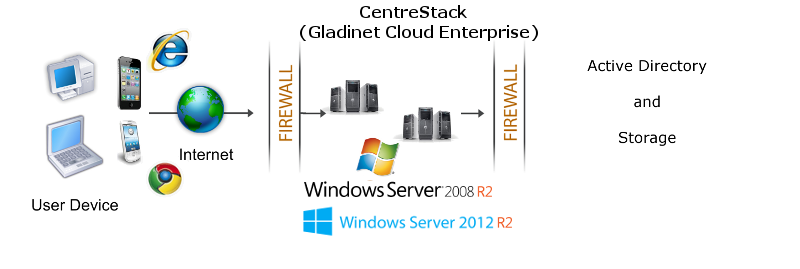
                                It is recommended that CentreStack be installed on Windows 2008 w/
                                Service Pack 2 or R2 servers, or Windows 2012 servers as shown in the following configuration. You can connect
                                the Active Directory to the CentreStack instance as the user manager.
                                You can also connect your local file server to the CentreStack Server.</p>
                            <img src="images/dmz.png" />
                            <a name="summary"></a>
                            <h2>
                                Summary</h2>
                            <p>
                                CentreStack leverages the local connectivity to Active Directory and
                                your own storage solution to create a self-hosted dropbox alternative solution.
                                The benefit is to give security and control back in your hands.
                            </p>
                            <p>
                                For more information, please contact Gladinet Support @ enterprise@gladinet.com
                                or visit <a class="normal" href="http://www.gladinet.com">http://www.gladinet.com</a>
                            </p>
                            <h2>
                                See Also</h2>
                            <p>
                                <a href="SyncShare.aspx">Installable Enterprise Sync &amp; Share Solution</a>
                            </p>
                        </td>
                    </tr>
                </table>
            </td>
        </tr>
        <tr>
            <td>
                <table>
                    <tr>
                        <td>
                            &nbsp;
                        </td>
                    </tr>
                </table>
            </td>
        </tr>
        <tr>
            <td>
            </td>
        </tr>
    </table>
    <table>
        <tr>
            <td>
                &nbsp;
            </td>
        </tr>
    </table>
    <table width="860" border="0" align="center" cellpadding="0" cellspacing="0">
        <tr>
            <td colspan="2">
                &nbsp;
            </td>
        </tr>
        <tr>
            <td class="style13">
                <span>Additional questions?&nbsp; Contact Gladinet Support at support@gladinet.com.</span>
            </td>
        </tr>
    </table>
</asp:Content>