﻿<%@ Page Language="C#" AutoEventWireup="true" CodeBehind="SharePointReplacement.aspx.cs"
    Inherits="cloudenterprise.SharePoint" MasterPageFile="Site.master" %>

<asp:Content ID="Content1" runat="server" ContentPlaceHolderID="ContentTitle">
    SharePoint Replacement Solution
</asp:Content>

<asp:Content ID="Content2" runat="server" ContentPlaceHolderID="SEOBlock">
    <meta name="keywords" content="sharepoint replacement, sharepoint like solution, cloud storage, online storage, cloud storage client, self-hosted dropbox" />
    <meta name="description" content="CentreStack (GLADINET Cloud Enterprise) provides a sharepoint like replacement solution with cloud storage access methods, with file server integration, broad mobile support and more. Great alternative to Dropbox and OwnCloud, with backup, access, sync, integration, connect, identity control & management" />
</asp:Content>
<asp:Content ID="Content" runat="server" ContentPlaceHolderID="MainContent">
    <a name='teams'></a>
    <table width="860" align="center" border="0" cellspacing="0" cellpadding="0" style="padding: 0px;">
        <tr>
            <td>
                &nbsp;
            </td>
        </tr>
        <tr>
            <td class="checkout" width="860" style="padding: 16px;">
                <a name='promo'></a>
                <table width="860" border="0" align="center" cellpadding="0" cellspacing="0" style="margin: 0px;
                    padding: 0px;">
                    <tr>
                        <td style="vertical-align: top; border-top: 0 solid #d0d0d0; text-align: center;">
                            <h1>
                                SharePoint Replacement Solution</h1>
                        </td>
                    </tr>
                    <tr>
                        <td style="vertical-align: top; border-top: 0 solid #d0d0d0; text-align: center;
                            padding-top: 6px; padding-bottom: 16px;">
                            <span class="headsubtitle1">A modern cloud-like private sharing and collaboration solution</span>
                        </td>
                    </tr>
                    <tr>
                        <td>
                            <div class="toc" style="float: left;">
                                <b style="margin-left: 8px;">Table of Contents</b><br />
                                <ul style="list-style-type: circle;">
                                    <li><a class="normal" href="#intro">Introduction</a></li>
                                    <li><a class="normal" href="#problem">Problem Statement</a></li>
                                    <li><a class="normal" href="#gladinet">Gladinet Solution</a></li>
                                    <li><a class="normal" href="#imp">Implementation</a></li>
                                    <li><a class="normal" href="#summary">Summary</a></li>
                                </ul>
                            </div>
                            <a name="intro"></a>
                            <h2>
                                Introduction</h2>
                            <p>
                                This white paper describes CentreStack product and how it can be used
                                to create a SharePoint like&nbsp; solution, completely on-premise, and completely
                                under your Enterprise's control.
                            </p>
                            <a name="problem"></a>
                            <h2>
                                Problem Statement</h2>
                            <p>
                                Online storage solutions are so easy to use that Enterprises have seen employees
                                using them as a quick way to pass files around for easy access. As a result, more
                                and more employees are using online storage solutions as a way to do online collaboration
                                and file sharing, however, in an un-official way, without the blessing of company
                                IT.
                            </p>
                            <p>
                                Traditionally, SharePoint Service is the solution for collaboration and file sharing
                                behind firewall, on-premise and servicing the local area network. It is cumbersome
                                to setup and cumbersome to use but maybe the only solution available.
                            </p>
                            <p>
                                With the online storage services showing how file-sharing and collaboration can
                                be done right, in a user friendly way. There is a need to combine the
                                ease-of-use from online storage and the secure-on-premise deployment of
                                SharePoint, to create an easy-to-use modern SharePoint-like solution, readily
                                for on-premise deployment, replacing your existing SharePoint deployment.</p>
                            <h2>
                                Gladinet Solution</h2>
                            <p>
                                A better solution would be to leverage all the nice web browser HTML 5 features,
                                all the sync-and-share desktop clients and all the iOS, Android applications from
                                online storage service and apply it to on-premise storage service, creating a solution
                                that enterprise can completely own ,from the backend storage to the front-end web
                                browser, desktop client and mobile access solutions. And yet, make it work like
                                Share-Point but with modern access methods and ease-of-use.</p>
                            <a name="imp"></a>
                            <h2>
                                Implementation #1</h2>
                            <p>
                                You can use CentreStack and your own file server as the backend storage.
                                You would put the CentreStack server farm inside a DMZ zone. On the
                                front side firewall, you can have port 80 and port 443 open for web based access
                                and remote access. On the back side of the firewall, you have CIFS/SMB port open
                                and optionally LDAP/Active Directory port open.
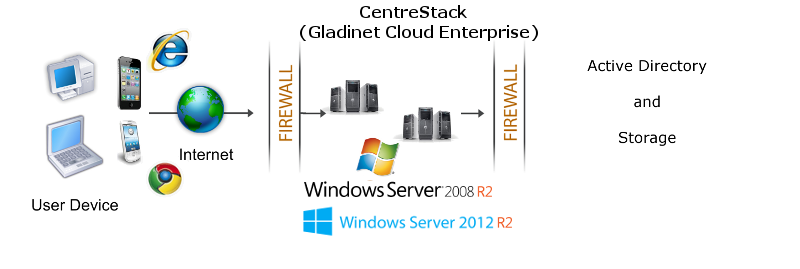
                            </p>
                            <img src="images/dmz.png" />
                            <h2>
                                Implementation #2</h2>
                            <p>
                                Instead of using file server as the backend storage, you can have private cloud
                                storage services such as OpenStack Swift as the default storage.</p>
                            <p>
                                In this implementation, instead of opening CIFS/SMB ports on the back side of the
                                firewall, you will open 80/443 port to access the cloud storage service via the
                                REST/HTTP protocol.</p>
                            <h2>
                                Summary</h2>
                            <p>
                                You can use CentreStack to create an Enterprise-owned and operated
                                file sync and share solution, just like SharePoint service. The solution covers browser-based access, desktop
                                clients, file server clients and mobile apps.</p>
                            <a href="http://www.gladinet.com/cloudenterprise/partner.aspx">
                                <img src="../images/btn_contact.gif" border="0" /></a>&nbsp;&nbsp;
                            <h2>
                                Ready to Start?</h2>
                            <p>
                                Once you fill out the form, we will send the product download link to your business
                                email address.

                            </p>
                            <a href="Signup.aspx">
                                <img src="../images/btn_signup.gif" border="0" /></a>&nbsp;&nbsp;
                                 <h2>
                                See Also</h2>
                            <p>
                                <a href="SyncShare.aspx">Installable Enterprise Sync &amp; Share Solution</a>
                            </p>
                            <p>
                                <a href="OnlineAccess.aspx">Secure Online Access to Your Private Cloud</a>
                            </p>
                            <p>
                                <a href="ActiveDirectory.aspx">Access Cloud Storage with Active Directory Identities</a>
                            </p>
                            <p>
                                <a href="CloudSolutionForMSP.aspx">Cloud Sync &amp; Share, Team Collaboration Solution
                                    for Managed Service Provider</a>
                            </p>
                            <p> <a href="SharePointReplacement.aspx">SharePoint Replacement</a></p>

                            <p><a href="PrivateShare.aspx">Enterprise Private File Sharing</a></p>
                            <p>
                                <a href="HomeDirectoryOnline.aspx">Easy Online Access to User's Home Directory</a>
                            </p>
                             <p>
                                <a href="EnterpriseDropbox.aspx">Enterprise Dropbox Alternative Solution</a>
                            </p>
                            <p>
                                <a href="SelfHostedCloudStorage.aspx">Self Hosted Cloud Storage Solution</a>
                            </p>
                        </td>
                    </tr>
                </table>
            </td>
        </tr>
    </table>
</asp:Content>