﻿<%@ Page Language="C#" AutoEventWireup="true" CodeBehind="OnlineAccess.aspx.cs" Inherits="cloudenterprise.OnlineAccess"
    MasterPageFile="Site.master" %>

<asp:Content ID="Content1" runat="server" ContentPlaceHolderID="ContentTitle">
  Secure Online Access to Your Private File Server
</asp:Content>
<asp:Content ID="Content2" runat="server" ContentPlaceHolderID="SEOBlock">
    <meta name="keywords" content="enterprise dropbox alternative, enterprise dropbox replacement, owncloud alternative, cloud storage, private cloud, cloud enterprise, enterprise cloud,  self-hosted dropbox, enterprise dropbox, owncloud alternative, cloud desktop, cloud gateway, cloud agent, Cloud computing environment, map drive, backup, online backup,  online storage, cloud storage, cloud storage client, amazon s3, skydrive, HP docs, HP picasa, emc atmos, synaptic storage, nirvanix, mezeo, Peer1 CloudOne, HP Storage for Developer" />
    <meta name="description" content="CentreStack (GLADINET cloud enterprise) provides self-hosted cloud storage solutions that is alternative to Dropbox and OwnCloud, with backup, access, sync, integration, connect, identity & control management. It is a self-hosted enterprise dropbox alternative and enterprise dropbox replacement solution. This whitepaper focuses on secure online access to your private enterprise file server." />
</asp:Content>
<asp:Content ID="Content" runat="server" ContentPlaceHolderID="MainContent">
    <a name='teams'></a>
    <table width="860" align="center" border="0" cellspacing="0" cellpadding="0" style="padding: 0px;">
        <tr>
            <td>
                &nbsp;
            </td>
        </tr>
        <tr>
            <td class="checkout" width="860" style="padding: 16px;">
                <a name='promo'></a>
                <table width="860" border="0" align="center" cellpadding="0" cellspacing="0" style="margin: 0px;
                    padding: 0px;">
                    <tr>
                        <td style="vertical-align: top; border-top: 0 solid #d0d0d0; text-align: center;">
                            <h1>
                                Secure Online Access to Your Private Cloud</h1>
                        </td>
                    </tr>
                    <tr>
                        <td style="vertical-align: top; border-top: 0 solid #d0d0d0; text-align: center;
                            padding-top: 6px; padding-bottom: 16px;">
                            <span class="headsubtitle1">Secure Anywhere, Any Device Access to Your Private Cloud
                                Storage</span>
                        </td>
                    </tr>
                    <tr>
                        <td style="padding-left: 0px; padding-top: 16px; padding-bottom: 16px; font-size: 16px;">
                            <div class="toc" style="float: left;">
                                <b style="margin-left: 8px;">Table of Contents</b><br />
                                <ul style="list-style-type: circle;">
                                    <li><a class="normal" href="#intro">Introduction</a></li>
                                    <li><a class="normal" href="#problem">Problem Statement</a></li>
                                    <li><a class="normal" href="#previous">Previous Options</a></li>
                                    <li><a class="normal" href="#gladinet">Gladinet Solution</a></li>
                                    <li><a class="normal" href="#imp">Implementation</a></li>
                                    <li><a class="normal" href="#summary">Summary</a></li>
                                </ul>
                            </div>
                            <a name="intro"></a>
                            <h2>
                                Introduction
                            </h2>
                            <p>
                                This white paper describes CentreStack which can be used by businesses
                                to privately deploy and host file sync and share solutions, providing an access layer
                                (browser, mobile, desktop and file server access)
                                around private cloud storage service and local file server network shares, and retaining full control of data storage
                                and the related access infrastructure.
                            </p>
                            <a name="problem"></a>
                            <h2>
                                Problem Statement
                            </h2>
                            <p>
                                Public cloud storage solutions have become increasingly convenient as they enable
                                anywhere access to files and folders for web browsers, desktops and mobile devices,
                                with sync and share capabilities. And we have seen companies like Dropbox and Box
                                leading the charge to popularize these public cloud access methods.</p>
                            <p>
                                However, you are still using file server as your traditional file sharing platform.
                                To access the file servers outside of company, you will need to setup VPN. 
                                To access the file servers from mobile devices, you will need to setup some VPN or other applications.
                                To access the files and folders from the file server directly over web browser, it wasn't possible in the past. 
                            </p>
                   
                            <a name="previous"></a>
                            <h2>
                                Previous Options
                            </h2>
                            <p>
                                VPN may be the option you had. First it is cumbersome. Second, it still not easy to 
                                access file server from mobile devices or from web browsers.
                            </p>
                            <a name="gladinet"></a>
                            <h2>
                                Gladinet Solution
                            </h2>
                            <p>
                                CentreStack provides a solution for the problem above by wrapping
                                all the public file sync and share features into a Windows Installer (MSI) package that
                                you can install on your own. The solution provides a complete access solution covering
                                browser access, mobile device access, desktop client access and file server access,
                                all with the speed of streaming HTTP transfer.
                            </p>
                            <h3 class="headsubtitle2">
                                Benefit 1 - Multiple Device Access</h3>
                            <p>
                                You can access private cloud storage from multiple devices such as from a web browser,
                                a mobile device, a desktop PC or another file server in a different location.
                            </p>
                            <h3 class="headsubtitle2">
                                Benefit 2 - Feature Rich Solution</h3>
                            <p>
                                Beyond read and write to files inside private cloud storage service, Gladinet Cloud solution
                                also provides file sync and share, backup and restore and team collaboration related solutions.
                            </p>
                            <h3 class="headsubtitle2">
                                Benefit 3 - Speed of Transfer</h3>
                            <p>
                                Cloud storage services are designed to work over HTTP. HTTP is a streaming protocol and faster than
                                traditional CIFS/SMB protocol.
                            </p>
                            <a name="imp"></a>
                            <h2>
                                Implementation
                            </h2>
                            <p>
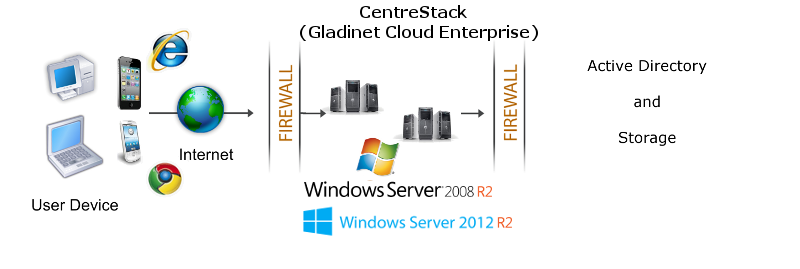
                                CentreStack should be installed on Windows 2008 R2 servers, or Windows 2012 R2 servers
                                as shown in the following configuration.</p>
                            <img src="images/dmz.png" />
                            <p>
                                You will install the CentreStack inside a DMZ zone. It will have a
                                public DNS name that client devices can use to connect.
                            </p>
                            <p>
                                Below is a diagram for a Gladinet Cloud
                                Enterprise Cluster, when there&#39;s more than
                                one server in the server farm.
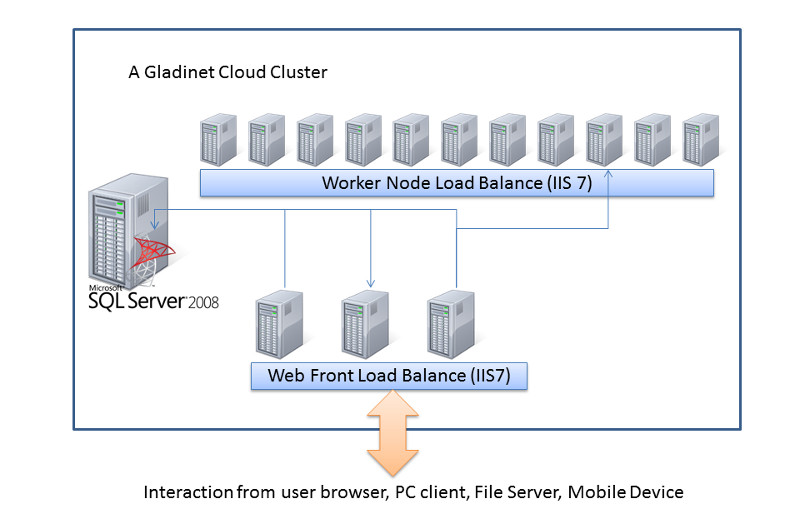
                            </p>
                            <img src="images/gclouddia3.jpg" />
                            <p>
                                For detailed implementation and deployment information, please reference the Gladinet
                                Cloud Enterprise Deployment Guide.</p>
                            <a name="summary"></a>
                            <h2>
                                Summary</h2>
                            <p>
                                CentreStack leverages both the feature set of public file sync and share service and 
                                also the strength of control of private installation by
                                packaging the features into a simple Windows Installable package.
                            </p>
                            <p>
                                The end result is a solution that Enterprises can easily deploy for their own private cloud storage service,
                                with deep Active Directory integration.
                            </p>
                            <p>
                                For more information, please contact Gladinet Support @ enterprise@gladinet.com
                                or visit <a class="normal" href="http://www.gladinet.com">http://www.gladinet.com</a>
                            </p>
                           <h2>
                                See Also</h2>
                            <p>
                                <a href="SyncShare.aspx">Installable Enterprise Sync &amp; Share Solution</a>
                            </p>
                            <p>
                                <a href="OnlineAccess.aspx">Secure Online Access to Your Private Cloud</a>
                            </p>
                            <p>
                                <a href="ActiveDirectory.aspx">Access Cloud Storage with Active Directory Identities</a>
                            </p>
                            <p>
                                <a href="CloudSolutionForMSP.aspx">Cloud Sync &amp; Share, Team Collaboration Solution
                                    for Managed Service Provider</a>
                            </p>
                            <p> <a href="SharePointReplacement.aspx">SharePoint Replacement</a></p>

                            <p><a href="PrivateShare.aspx">Enterprise Private File Sharing</a></p>
                            <p>
                                <a href="HomeDirectoryOnline.aspx">Easy Online Access to User's Home Directory</a>
                            </p>
                             <p>
                                <a href="EnterpriseDropbox.aspx">Enterprise Dropbox Alternative Solution</a>
                            </p>
                            <p>
                                <a href="SelfHostedCloudStorage.aspx">Self Hosted Cloud Storage Solution</a>
                            </p>
                        </td>
                    </tr>
                </table>
            </td>
        </tr>
        <tr>
            <td>
                <table>
                    <tr>
                        <td>
                            &nbsp;
                        </td>
                    </tr>
                </table>
            </td>
        </tr>
        <tr>
            <td>
            </td>
        </tr>
    </table>
    <table>
        <tr>
            <td>
                &nbsp;
            </td>
        </tr>
    </table>
    <table width="860" border="0" align="center" cellpadding="0" cellspacing="0">
        <tr>
            <td colspan="2">
                &nbsp;
            </td>
        </tr>
        <tr>
            <td class="style13">
                <span>Additional questions?&nbsp; Contact Gladinet Support at support@gladinet.com.</span>
            </td>
        </tr>
    </table>
</asp:Content>