﻿<%@ Page Language="C#" AutoEventWireup="true" CodeBehind="NovellFilrAlternativeReplacement.aspx.cs"
    Inherits="cloudenterprise.NovellFilr" MasterPageFile="Site.master" %>

<asp:Content ID="Content1" runat="server" ContentPlaceHolderID="ContentTitle">
    Novell Filr Alternative and Replacement Solution
</asp:Content>
<asp:Content ID="Content2" runat="server" ContentPlaceHolderID="SEOBlock">
    <meta name="keywords" content="OwnCloud, OwnCloud alternative, Novell Filr, cloud storage, private cloud, cloud enterprise, enterprise cloud,  self-hosted dropbox, self-hosted owncloud, online storage, cloud storage, cloud storage client" />
    <meta name="description" content="CentreStack (GLADINET cloud enterprise) provides cloud storage related solutions for enterprise to self-host a Novell Filr alternative replacement solution, file sync and share solution." />
</asp:Content>
<asp:Content ID="Content" runat="server" ContentPlaceHolderID="MainContent">
    <style type="text/css">
        .content
        {
            padding-bottom: 12px;
            vertical-align: top;
        }
        .ctitle
        {
            vertical-align: top;
            background-color:#e0e0e0;
        }
    </style>
    <a name='teams'></a>
    <table width="860" align="center" border="0" cellspacing="0" cellpadding="0" style="padding: 0px;">
        <tr>
            <td>
                &nbsp;
            </td>
        </tr>
        <tr>
            <td class="checkout" width="860" style="padding: 16px;">
                <a name='promo'></a>
                <table width="860" border="0" align="center" cellpadding="0" cellspacing="0" style="margin: 0px;
                    padding: 0px;">
                    <tr>
                        <td style="vertical-align: top; border-top: 0 solid #d0d0d0; text-align: center;">
                            <h1>
                                Self-Hosted Novell Filr Alternative and Replacement</h1>
                        </td>
                    </tr>
                    <tr>
                        <td style="vertical-align: top; border-top: 0 solid #d0d0d0; text-align: center;
                            padding-top: 6px; padding-bottom: 16px;">
                            <span class="headsubtitle1">Provide a Dropbox-like Solution to Your Users for Security
                                and Control</span>
                        </td>
                    </tr>
                    <tr>
                        <td style="padding-left: 0px; padding-top: 16px; padding-bottom: 16px; font-size: 16px;">
                            <div class="toc" style="float: left;">
                                <b style="margin-left: 8px;">Table of Contents</b><br />
                                <ul style="list-style-type: circle;">
                                    <li><a class="normal" href="#intro">Introduction</a></li>
                                    <li><a class="normal" href="#problem">Problem Statement</a></li>
                                    <li><a class="normal" href="#gladinet">Gladinet Solution</a></li>
                                    <li><a class="normal" href="#imp">Implementation</a></li>
                                    <li><a class="normal" href="#summary">Summary</a></li>
                                </ul>
                                <b style="margin-left: 8px;">Picture Gallery Links</b>
                                <ul style="text-align: left; list-style-type: circle;">
                                    <li><a class="normal" href="features/msp-enterprise-web-access.aspx">Web Browser Access</a></li>
                                    <li><a class="normal" href="features/msp-enterprise-windows-desktop.aspx">Windows Desktop
                                        Access</a></li>
                                    <li><a class="normal" href="features/msp-enterprise-macosx.aspx">Mac OS X Desktop Access</a></li>
                                    <li><a class="normal" href="features/msp-enterprise-mobile-access.aspx">Mobile Access</a></li>
                                    <li><a class="normal" href="features/msp-enterprise-ios-phone-pad.aspx">iOS Access</a></li>
                                    <li><a class="normal" href="features/msp-enterprise-android.aspx">Android Access</a></li>
                                    <li><a class="normal" href="features/msp-enterprise-windows-phone.aspx">Windows Phone
                                        8 Access</a></li>
                                    <li><a class="normal" href="features/msp-enterprise-windows-store-app.aspx">Windows
                                        Surface (RT) Access</a></li>
                                    <li><a class="normal" href="features/msp-enterprise-file-server.aspx">File Server Access</a></li>
                                    <li><a class="normal" href="features/msp-enterprise-online-collaboration.aspx">Online
                                        Collaboration</a></li>
                                    <li><a class="normal" href="features/msp-enterprise-file-and-folder-share.aspx">File
                                        and Folder Share</a> </li>
                                    <li><a class="normal" href="features/msp-enterprise-file-server-migration.aspx">Migrate
                                        File Server</a> </li>
                                    <li><a class="normal" href="features/msp-enterprise-unify-branch-office.aspx">Unify
                                        Branch Office File Structure</a></li>
                                </ul>
                                <b style="margin-left: 8px;">Video Gallery Links</b>
                                <ul style="text-align: left; list-style-type: circle;">
                                    <li><a class="normal" href="features/VideoGallery.aspx">Video Links</a></li>
                                </ul>
                                <a style="margin-left: 8px;" href="Signup.aspx">
                                    <img src="../images/tryitbtn.jpg" border="0" /></a>
                            </div>
                            <a name="intro"></a>
                            <h2>
                                Introduction
                            </h2>
                            <p>
                                <img src="features/images/access.png" style="float: left; padding-right: 8px; padding-bottom: 8px;" />
                                This white paper describes CentreStack. The solution can be used by
                                businesses and service providers to privately deploy and host file sync and share solutions,
                                providing an access layer (browser, mobile, desktop and file server access) around
                                private cloud storage service and local file server storage, and retaining full
                                control of data and the related access infrastructure.
                            </p>
                            <p>
                                Quite often, our MSP partners and Enterprise customers refer to it as the self-hosted
                                dropbox alternative solution.
                                Enterprise customers often refer to it as Enterprise dropbox alternative
                                solution. It competes with Novell Filr for the enterprise
                                self-hosted file sync and share solution category.</p>
                            <h2>
                                Problem Statement
                            </h2>
                            <p>
                                Many of your business customers are now faced with the Dropbox problem. The employees
                                of the business are using Dropbox on their own to backup some local folders and
                                make them easy to access from over the Internet. However, from business perspective,
                                it is not good knowing that company documents may be scattered on multiple PCs and
                                in different places, creating liabilities for regulatory obligations and leakage
                                of business secrets.
                            </p>
                            <p>
                                Many of them are turning to you now for an answer. Since you are already manage
                                important IT infrastructure for the customer, it would be great if you could self-host
                                and manage a dropbox-like service for your business customers. Or if you are the
                                head of the enterprise IT department, the company is also depending on you to find
                                a solution.
                            </p>
                            <p>
                                You may already start looking for a solution and may found some solutions, most
                                of which are based on Apache, Linux, PHP, MySQL. Or packaged into a virtual
                                appliance. You may have found Novell Filr but it didn't work out for you. 
                                You need a more mature and easy solution that can be integrated
                                into your existing Windows environment.
                            </p>
                            <a name="gladinet"></a>
                            <h2>
                                Gladinet Solution
                            </h2>
                            <p>
                                CentreStack provides a solution for the problem above. First it enables
                                you to install and host the solution completely on-premise or inside a service provider's
                                data center. Second, it can be integrated with the file server storage, SAN storage
                                or NAS storage.
                            </p>
                            <h3 class="headsubtitle2">
                                Benefits</h3>
                            <table width="90%" style="border:1px dashed #808080;">
                                <tr>
                                    <td width="40%" class="ctitle">
                                        <b>Integrate natively with Active Directory</b>
                                    </td>
                                    <td width="60%" class="content">
                                        There is no additional setup to add active directory users to the solution. Active
                                        Directory users can simply log in to the on-premise Gladinet Cloud web portal.
                                    </td>
                                </tr>
                                <tr>
                                    <td class="ctitle">
                                        <b>Native integration with Home Directory </b>
                                    </td>
                                    <td class="content">
                                        User's home directory information will be directly used for web browser based and
                                        mobile device access, if the Home-Directory integration option is turned on.
                                    </td>
                                </tr>
                                <tr>
                                    <td class="ctitle">
                                        <b>Integration with Your Existing Storage</b>
                                    </td>
                                    <td class="content">
                                        The solution can be integrated with your existing storage, whether it be file server
                                        storage, SAN storage or NAS storage. In addition, you can also connect to your own
                                        public cloud storage services. You can even use existing files and folders and expose
                                        them to use right away.
                                    </td>
                                </tr>
                                <tr>
                                    <td class="ctitle">
                                        <b>Supports both Multi/Single-tenant Deployment</b>
                                    </td>
                                    <td class="content">
                                        There are two CentreStack packages, one for single-tenant and other
                                        other for multi-tenant. It is up to you how you will deploy the solution and it
                                        is very flexible.
                                    </td>
                                </tr>
                                <tr>
                                    <td class="ctitle">
                                        <b>Standard Microsoft Web Platform</b>
                                    </td>
                                    <td class="content">
                                        CentreStack is built on top of standard Microsoft web platform technology,
                                        including Windows Server 2008/2012, .NET Framework, ASP.NET and SQL Server (Express).
                                        These are all very familiar topics for a Windows System Administrator to mater and
                                        do self-deployment of the solution
                                    </td>
                                </tr>
                                <tr>
                                    <td class="ctitle">
                                        <b>Pure Software Solution</b>
                                    </td>
                                    <td class="content">
                                        CentreStack is packaged into a standard Windows Installer (MSI) and it is very easy to install.
                                        It is also very flexible for you to decide where to install and deploy the solution. For example, you
                                        can deploy into an Amazon EC2/VPC environment or on-premise, it is more flexible than virtual appliance.
                                    </td>
                                </tr>
                                <tr>
                                    <td class="ctitle">
                                        <b>Support Different Kinds of Storage Options</b>
                                    </td>
                                    <td class="content">
                                        CentreStack supports not only CIFS/SMB network share, storage from NAS or SAN, but also other kind of
                                        storage options, such as OpenStack Swift or EMC Atmos.
                                    </td>
                                </tr>
                                <tr>
                                    <td class="ctitle">
                                        <b>Support Different Deployment Options</b>
                                    </td>
                                    <td class="content">
                                        CentreStack is pure software solution. Compared to virtual appliance based solution, it is
                                        easier to deploy, you can deploy on physical server, VMWare virtual server, Xen virtual server, or Amazon VPC
                                        or other virtual private data center locations.
                                    </td>
                                </tr>
                            </table>
                            <a name="imp"></a>
                            <h2>
                                Implementation
                            </h2>
                            <p>
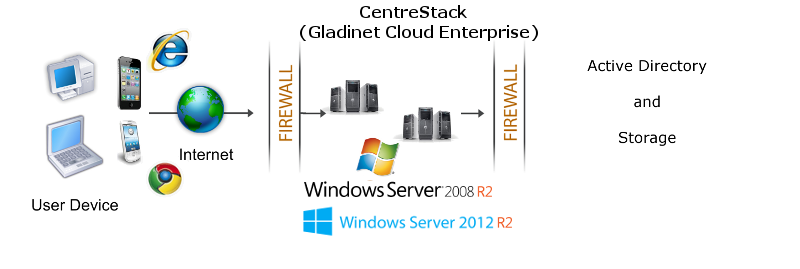
                                It is recommended that CentreStack be installed on Windows 2008
                                R2 servers, or Windows 2012 R2 servers as shown in the following configuration. You can connect
                                the Active Directory to the CentreStack instance as the user manager.
                                You can also connect your local file server to the CentreStack Server.</p>
                            <img src="images/dmz.png" />
                            <a name="summary"></a>
                            <h2>
                                Summary</h2>
                            <p>
                                CentreStack leverages the local connectivity to Active Directory and
                                your own storage solution to create a self-hosted dropbox alternative solution.
                                The benefit is to give security and control back in your hands.
                            </p>
                            <p>
                                For more information, please contact Gladinet Support @ enterprise@gladinet.com
                                or visit <a class="normal" href="http://www.gladinet.com">http://www.gladinet.com</a>
                            </p>
                            <h2>
                                See Also</h2>
                            <p>
                                <a href="SyncShare.aspx">Installable Enterprise Sync &amp; Share Solution</a>
                            </p>
                        </td>
                    </tr>
                </table>
            </td>
        </tr>
        <tr>
            <td>
                <table>
                    <tr>
                        <td>
                            &nbsp;
                        </td>
                    </tr>
                </table>
            </td>
        </tr>
        <tr>
            <td>
            </td>
        </tr>
    </table>
    <table>
        <tr>
            <td>
                &nbsp;
            </td>
        </tr>
    </table>
    <table width="860" border="0" align="center" cellpadding="0" cellspacing="0">
        <tr>
            <td colspan="2">
                &nbsp;
            </td>
        </tr>
        <tr>
            <td class="style13">
                <span>Additional questions?&nbsp; Contact Gladinet Support at support@gladinet.com.</span>
            </td>
        </tr>
    </table>
</asp:Content>