﻿<%@ Page Language="C#" AutoEventWireup="true" CodeBehind="HomeDirectoryDropbox.aspx.cs"
    Inherits="cloudenterprise.HomeDirectoryDropbox" MasterPageFile="Site.master" %>

<asp:Content ID="Content1" runat="server" ContentPlaceHolderID="ContentTitle">
    Give User Home Directory a Dropbox-Like Access
</asp:Content>
<asp:Content ID="Content2" runat="server" ContentPlaceHolderID="SEOBlock">
    <meta name="keywords" content="enterprise dropbox alternative, enterprise dropbox replacement, owncloud alternative, cloud storage, private cloud, cloud enterprise, enterprise cloud,  self-hosted dropbox, enterprise dropbox, owncloud alternative, cloud desktop, cloud gateway, cloud agent, Cloud computing environment, map drive, backup, online backup,  online storage, cloud storage, cloud storage client, amazon s3" />
    <meta name="description" content="CentreStack (GLADINET cloud enterprise) provides self-hosted cloud storage solutions that is alternative to Dropbox and OwnCloud, with backup, access, sync, integration, connect, identity & control management. It is a self-hosted enterprise dropbox alternative and enterprise dropbox replacement solution. This whitepaper focuses on accessing user's home directory with dropbox-like accessing platform." />
</asp:Content>
<asp:Content ID="Content" runat="server" ContentPlaceHolderID="MainContent">
    <a name='teams'></a>
    <table width="860" align="center" border="0" cellspacing="0" cellpadding="0" style="padding: 0px;">
        <tr>
            <td>
                &nbsp;
            </td>
        </tr>
        <tr>
            <td class="checkout" width="860" style="padding: 16px;">
                <a name='promo'></a>
                <table width="860" border="0" align="center" cellpadding="0" cellspacing="0" style="margin: 0px;
                    padding: 0px;">
                    <tr>
                        <td style="vertical-align: top; border-top: 0 solid #d0d0d0; text-align: center;">
                            <h1>
                                Give User Home Directory a Dropbox-Like Access</h1>
                        </td>
                    </tr>
                    <tr>
                        <td style="vertical-align: top; border-top: 0 solid #d0d0d0; text-align: center;
                            padding-top: 6px; padding-bottom: 16px;">
                            <span class="headsubtitle1">Connect User's Active Directory Home Directory to Remote
                                User's Desktop</span>
                        </td>
                    </tr>
                    <tr>
                        <td style="padding-left: 0px; padding-top: 16px; padding-bottom: 16px; font-size: 16px;">
                            <div class="toc" style="float: left;">
                                <b style="margin-left: 8px;">Table of Contents</b><br />
                                <ul style="list-style-type: circle;">
                                    <li><a class="normal" href="#intro">Introduction</a></li>
                                    <li><a class="normal" href="#problem">Problem Statement</a></li>
                                    <li><a class="normal" href="#previous">Previous Options</a></li>
                                    <li><a class="normal" href="#gladinet">Gladinet Solution</a></li>
                                    <li><a class="normal" href="#imp">Implementation</a></li>
                                    <li><a class="normal" href="#summary">Summary</a></li>
                                </ul>
                            </div>
                                  <div style="float:right;padding:8px; padding-right:8px;">
                                <a id='introthumb' class="various iframe" href="http://www.youtube.com/embed/R8OvR2VVR00?hd=1&autoplay=1">
                        <img src="images/intro.jpg" alt="CentreStack Intro Video" /></a>
                            </div>
                            <a name="intro"></a>
                            <h2>
                                Introduction
                            </h2>
                            <p>
                                This white paper describes CentreStack with Active Directory Home
                                Directory integration. The solution can be used by businesses to privately deploy
                                and host a file sync and share solution, providing an access layer (browser, mobile, desktop
                                and file server access) around private cloud storage service and local file server
                                storage, and retaining full control of data and the related access infrastructure.
                            </p>
                            <h2>
                                Problem Statement
                            </h2>
                            <p>
                                <b>The Remote Site Headache</b> - You have multiple sites and remote offices.
                                For users from the remote sites, they are so used to save documents to the local
                                My Documents folder. Even though there is a file server local to the remote site, users
                                are still save documents to My Documents folder on their desktop. However, in the past
                                weeks, there were already several cases that the user’s PC broke down and together, took
                                away the data stored on it.
                            </p>
                            <p>
                                <b>The Dropbox Problem</b> - Some users from the remote sites are using Dropbox
                                on their own to solve the data backup problem. However, for your company, Dropbox
                                is both a solution and a problem. The company simply can’t allow users to sync files
                                anywhere because it needs to meet certain data compliance criteria. You have to
                                find a solution that is similar to Dropbox but allowing you to have full control
                                of the data.
                            </p>
                            <a name="previous"></a>
                            <h2>
                                Previous Options
                            </h2>
                            <p>
                                The company already standardized on Microsoft technologies such as Active Directory
                                and File Server, with each user assigned a home directory from the file server.
                                There may be VPNs in between the main office and the remote office. But again, if
                                users are used to save documents to My Documents folder, not even bother to save
                                to the remote office’s local file server, How easy will it be asking the users to
                                connect the VPN, map a drive to active directory home directory and save documents
                                there? The usability barrier is just too high.</p>
                            <p>
                                Ideally, you want to find a solution, that can turn the remote user’s My Documents
                                folder into an enterprise drop box, synchronize the local documents directly into
                                the company’s file server, inside each user’s Active Directory home directory.
                            </p>
                            <a name="gladinet"></a>
                            <h2>
                                CentreStack Solution
                            </h2>
                            <p>
                                CentreStack provides a solution for the problem above by natively
                                integrated with Active Directory and the home directory settings in the Active Directory.
                                As an end result, User can easily access their home directory from web browser,
                                mobile devices, desktop and file servers.
                            </p>
                            <p>
                                There are many hurdles CentreStack overcome to make this happen.
                                <ul>
                                    <li>First, how to connect the remote offices to the company’s file server without setting
                                        up VPN? How to get it done when the only communication channel is HTTPS? </li>
                                    <li>Second, how to monitor the My Documents folder and send the documents to user’s
                                        home directory? </li>
                                    <li>Third, how to maintain security and single sign-on so only authorized users can
                                        use the solution? </li>
                                    <li>Forth, how to link the user’s storage with user’s Active Directory home directory?
                                    </li>
                                </ul>
                            </p>
                            <p>
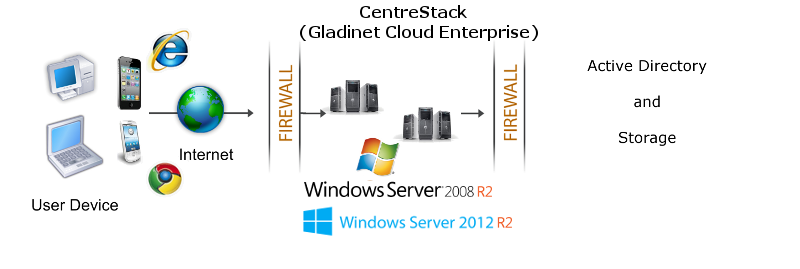
                                CentreStack solves the problem by creating a 3-tier architecture,
                                <ul>
                                    <li>The access clients on user’s desktop and on web browser; </li>
                                    <li>The Gladinet access infrastructure that can be installed on-premise; </li>
                                    <li>The ability to connect to enterprise file server as backend cloud storage. </li>
                                </ul>
                            </p>
                            <img src="images/dmz.png" />
                            <h3 class="headsubtitle2">
                                Benefit 1 - Support Active Directory Users</h3>
                            <p>
                                There is no additional setup to add active directory users to the solution. Active
                                Directory users can simply log in to the on-premise Gladinet Cloud web portal.
                            </p>
                            <h3 class="headsubtitle2">
                                Benefit 2 - Native integration with Home Directory</h3>
                            <p>
                                User's home directory information will be directly used for web browser based and
                                mobile device access.
                            </p>
                            <a name="imp"></a>
                            <h2>
                                Implementation
                            </h2>
                            <p>
                                It is recommended that CentreStack be installed on Windows 2008 w/
                                Service Pack 2 servers, or Windows 2012/R2 servers. You can connect
                                the Active Directory to the CentreStack instance as the user manager.
                                You can also connect your local file server to the CentreStack Server.</p>
                            <a name="summary"></a>
                            <h2>
                                Summary</h2>
                            <p>
                                At the end, the remote users can go to the enterprise web portal, download the access
                                client and turn their local folders into enterprise drop box folders. Files saved
                                to their local folder will be migrated to their user’s home directory folder automatically.
                            </p>
                            <p>
                                For more information, please contact Gladinet Support @ enterprise@gladinet.com
                                or visit <a class="normal" href="http://www.gladinet.com">http://www.gladinet.com</a>
                            </p>
                            <h2>
                                See Also</h2>
                            <p>
                                <a href="SyncShare.aspx">Installable Enterprise Sync &amp; Share Solution</a>
                            </p>
                        </td>
                    </tr>
                </table>
            </td>
        </tr>
        <tr>
            <td>
                <table>
                    <tr>
                        <td>
                            &nbsp;
                        </td>
                    </tr>
                </table>
            </td>
        </tr>
        <tr>
            <td>
            </td>
        </tr>
    </table>
    <table>
        <tr>
            <td>
                &nbsp;
            </td>
        </tr>
    </table>
    <table width="860" border="0" align="center" cellpadding="0" cellspacing="0">
        <tr>
            <td colspan="2">
                &nbsp;
            </td>
        </tr>
        <tr>
            <td class="style13">
                <span>Additional questions?&nbsp; Contact Gladinet Support at support@gladinet.com.</span>
            </td>
        </tr>
    </table>
</asp:Content>