﻿<%@ Page Language="C#" AutoEventWireup="true" CodeBehind="EnterpriseDropbox.aspx.cs"
    Inherits="cloudenterprise.EnterpriseDropbox" MasterPageFile="Site.master" %>

<asp:Content ID="Content1" runat="server" ContentPlaceHolderID="ContentTitle">
    Enterprise Dropbox Alternative
</asp:Content>
<asp:Content ID="Content2" runat="server" ContentPlaceHolderID="SEOBlock">
    <meta name="keywords" content="enterprise dropbox alternative, enterprise dropbox replacement, owncloud alternative, cloud storage, private cloud, cloud enterprise, enterprise cloud,  self-hosted dropbox, enterprise dropbox, owncloud alternative, cloud desktop, cloud gateway, cloud agent, Cloud computing environment, map drive, backup, online backup,  online storage, cloud storage, cloud storage client, amazon s3, skydrive, HP docs, HP picasa, emc atmos, synaptic storage, nirvanix, mezeo, Peer1 CloudOne, HP Storage for Developer" />
    <meta name="description" content="CentreStack (GLADINET cloud enterprise) provides self-hosted cloud storage solutions that is alternative to Dropbox and OwnCloud, with backup, access, sync, integration, connect, identity & control management. It is a self-hosted enterprise dropbox alternative and enterprise dropbox replacement solution. This white paper discuss Enterprise Dropbox Alternative" />
</asp:Content>
<asp:Content ID="Content" runat="server" ContentPlaceHolderID="MainContent">
    <a name='teams'></a>
    <table width="860" align="center" border="0" cellspacing="0" cellpadding="0" style="padding: 0px;">
        <tr>
            <td>
                &nbsp;
            </td>
        </tr>
        <tr>
            <td class="checkout" width="860" style="padding: 16px;">
                <a name='promo'></a>
                <table width="860" border="0" align="center" cellpadding="0" cellspacing="0" style="margin: 0px;
                    padding: 0px;">
                    <tr>
                        <td style="vertical-align: top; border-top: 0 solid #d0d0d0; text-align: center;">
                            <h1>
                                Enterprise Dropbox Alternative</h1>
                        </td>
                    </tr>
                    <tr>
                        <td style="vertical-align: top; border-top: 0 solid #d0d0d0; text-align: center;
                            padding-top: 6px; padding-bottom: 16px;">
                            <span class="headsubtitle1">Provide an Enterprise Dropbox Alternative to Your Employees
                                for Security and Control</span>
                        </td>
                    </tr>
                    <tr>
                        <td style="padding-left: 0px; padding-top: 16px; padding-bottom: 16px; font-size: 16px;">
                            <div class="toc" style="float: left;">
                                <b style="margin-left: 8px;">Table of Contents</b><br />
                                <ul style="list-style-type: circle;">
                                    <li><a class="normal" href="#intro">Introduction</a></li>
                                    <li><a class="normal" href="#problem">Problem Statement</a></li>
                                    <li><a class="normal" href="#gladinet">Gladinet Solution</a></li>
                                    <li><a class="normal" href="#imp">Implementation</a></li>
                                    <li><a class="normal" href="#summary">Summary</a></li>
                                </ul>
                            </div>
                                  <div style="float:right;padding:8px; padding-right:8px;">
                                <a id='introthumb' class="various iframe" href="http://www.youtube.com/embed/R8OvR2VVR00?hd=1&autoplay=1">
                        <img src="images/intro.jpg" alt="CentreStack Intro Video" /></a>
                            </div>
                            <a name="intro"></a>
                            <h2>
                                Introduction
                            </h2>
                            <p>
                                This white paper describes CentreStack. The solution can be used by
                                businesses to privately deploy and host a file sync and share solution, providing an access
                                layer (browser, mobile, desktop and file server access) around private cloud storage
                                service and local file server storage, and retaining full control of data and the
                                related access infrastructure.
                            </p>
                            <h2>
                                Problem Statement
                            </h2>
                            <p>
                                As the CIO of the company, whether it be an enterprise or a medium sized business,
                                you are now faced with the Dropbox problem. The employees of the business are using
                                Dropbox on their own to backup some local folders and make them easy to access from
                                over the Internet. However, from business perspective, it is not good knowing that
                                company documents may be scattered on multiple PCs and in different places on a third
                                party hosting site, creating
                                liabilities for regulatory obligations and leakage of business secrets.
                            </p>
                            <p>
                                You can't simply say no to personal Dropbox accounts. Instead, it would be great
                                if you could self-host and manage a dropbox-like service for your business and give
                                your employee an alternative solution and replacement solution that is also user friendly and at the same
                                time, under your own control.
                            </p>
                            <a name="gladinet"></a>
                            <h2>
                                CentreStack Solution
                            </h2>
                            <p>
                                CentreStack provides a solution for the problem above. First it enables
                                you to install and host the solution completely on-premise or inside a trusted service
                                provider's data center. Second, it can be integrated with the file server storage,
                                SAN storage or NAS storage. This is a solution that you completely own and control.
                            </p>
                            <h3 class="headsubtitle2">
                                Benefit 1 - Support Active Directory Users</h3>
                            <p>
                                There is no additional setup to add active directory users to the solution. Active
                                Directory users can simply log in to the on-premise Gladinet Cloud web portal. When
                                an employee leaves company, you just simply turn off his/her active directory entry and
                                the access to the solution will be turned off as well.
                            </p>
                            <h3 class="headsubtitle2">
                                Benefit 2 - Native integration with Home Directory</h3>
                            <p>
                                Optionally, user's home directory information will be directly used for web browser based and
                                mobile device access. At work, employees are used to access the company wide personal home directory. Outside,
                                the employee will access to the same home directory.
                            </p>
                            <h3 class="headsubtitle2">
                                Benefit 3 - Integration with Your Own Storage</h3>
                            <p>
                                The solution can be integrated with your own storage, whether it be file server
                                storage, SAN storage or NAS storage. In addition, you can also connect to your own
                                public cloud storage services.
                            </p>


                            <a name="imp"></a>
                            <h2>
                                Implementation
                            </h2>
                            <p>
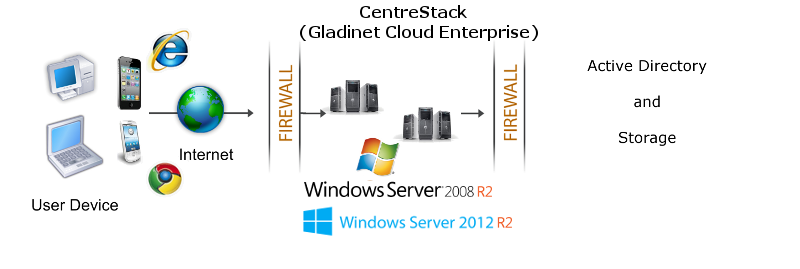
                                It is recommended that CentreStack be installed on Windows 2008 R2 servers, 
                                or Windows 2012 R2 servers as shown in the following configuration. You can connect
                                the Active Directory to the CentreStack instance as the user manager.
                                You can also connect your local file server to the CentreStack Server.</p>
                            <img src="images/dmz.png" />
                            <a name="summary"></a>
                            <h2>
                                Summary</h2>
                            <p>
                                CentreStack leverages the local connectivity to Active Directory and
                                enterprise&#39;s own storage solution to create a self-hosted dropbox alternative
                                solution. The benefit is to give security and control back in the hands of the
                                enterprise and the
                                employees.
                            </p>
                            <p>
                                For more information, please contact Gladinet Support @ enterprise@gladinet.com
                                or visit <a class="normal" href="http://www.gladinet.com">http://www.gladinet.com</a>
                            </p>
                            <h2>
                                See Also</h2>
                            <p>
                                <a href="SyncShare.aspx">Installable Enterprise Sync &amp; Share Solution</a>
                            </p>
                        </td>
                    </tr>
                </table>
            </td>
        </tr>
        <tr>
            <td>
                <table>
                    <tr>
                        <td>
                            &nbsp;
                        </td>
                    </tr>
                </table>
            </td>
        </tr>
        <tr>
            <td>
            </td>
        </tr>
    </table>
    <table>
        <tr>
            <td>
                &nbsp;
            </td>
        </tr>
    </table>
    <table width="860" border="0" align="center" cellpadding="0" cellspacing="0">
        <tr>
            <td colspan="2">
                &nbsp;
            </td>
        </tr>
        <tr>
            <td class="style13">
                <span>Additional questions?&nbsp; Contact Gladinet Support at support@gladinet.com.</span>
            </td>
        </tr>
    </table>
</asp:Content>