﻿<%@ Page Language="C#" AutoEventWireup="true" CodeBehind="BrandingGuide.aspx.cs"
    Inherits="cloudenterprise.BrandingGuide" MasterPageFile="Site.master" %>

<asp:Content ID="Content1" runat="server" ContentPlaceHolderID="ContentTitle">
    CentreStack (Gladinet Cloud Enterprise) Branding Guide
</asp:Content>
<asp:Content ID="Content2" runat="server" ContentPlaceHolderID="SEOBlock">
    <meta name="keywords" content="branding guide, cloud storage, private cloud, cloud enterprise, enterprise cloud,  self-hosted dropbox, self-hosted owncloud, online storage, cloud storage, cloud storage client" />
    <meta name="description" content="CentreStack (GLADINET cloud enterprise) provides cloud storage related solutions for MSP to self-host a dropbox-alternative/owncloud-alternative, file sync and share solution. This white paper documents the branding and white-label support." />
</asp:Content>
<asp:Content ID="Content" runat="server" ContentPlaceHolderID="MainContent">


                <a name="words"></a>
                <h1 class="intro" style="margin-top: 20px;">
                    CentreStack Full Branding Template</h1>
                <h2 style="color: #808080;">
                    Branding and White-Label Support</h2>
                <div class="toc" style="float: left;">
                    <b style="margin-left: 8px;">Table of Contents</b><br />
                    <ul style="list-style-type: circle;">
                        <li><a class="normal" href="#web">Web Portal</a></li>
                        <li><a class="normal" href="#basic">Basic Information</a></li>
                        <li><a class="normal" href="#windows">Windows Client Branding</a></li>
                        <li><a class="normal" href="#ios">iOS Application Branding</a></li>
                        <li><a class="normal" href="#droid">Android Application Branding</a></li>
                        <li><a class="normal" href="#mac">Mac OS X Client Branding</a></li>
                    </ul>
                    <b style="margin-left: 8px;">Download White Paper</b><br />
                    <a href="/serviceprovider/GladinetCloudBrandingTemplate.pdf">
                        <img src="images/reader.png" border="0" /></a>
                </div>
                <p>
                    CentreStack includes branding and white-label support. Out of the
                    box, the product is white-label ready and there are many items brand-able, such
                    as the web portal and the included white-label clients. However, for service providers
                    that require full branding service, most of the branding needs to happen at build
                    time and requires the following information prior to the full branding service.
                    The items include the artworks, End User License Agreements, and code signing certificates.</p>
                <p>
                    If the out-of-box branding options work for you, you can go straight to the cluster
                    manager branding section and configure the branding yourself. If you need full-branding
                    service instead, this article documents the full branding support and the required
                    materials.
                </p>
                <a name="web"></a>
                <h2>
                    Web Portal Branding</h2>
                <p>
                    Web portal branding is covered 100% by the cluster manager. There is a branding
                    section inside the cluster manager. Most of the items required in here can be directly
                    applied to the web portal branding section.&nbsp; See page <a href="BrandingOptions.aspx">
                        Branding Options</a> for web portal and white-label related options.
                </p>
                <h2>
                    Basic Information</h2>
                <p>
                    <ul>
                        <li>
                        Desired Delivery Date: _______9\30\2010________
                        <li>Company Name: ______________Gladinet_______________________
                            <br />
                            This will create c:\Program Files\Gladinet folder.</li>
                        <li>Product Name : ___________Gladinet Cloud Drive_______________
                            <ul>
                                <li>
                                This will create c:\program files\gladinet\gladinet cloud drive
                                <li>
                                This will also be the title of the program window
                            </ul>
                            <li>
                        Please specify a default drive letter. ______Z:\_______
                        <li>What do you call your cloud drive? ______My Gladinet Drive_____________
                            <ul>
                                <li>
                                This shows up in Windows Explorer
                            </ul>
                            <li>Company Text Logo:
                                <img src="images/branding/temp/text-logo130_30.png" />
                                <ul>
                                    <li>
                                    transparent background (.png format)
                                    <li>
                                    Mostly grey/black composition
                                    <li>
                                    dimension : 130x30 (pixels)
                                    <li>
                                    32-bit true color
                                </ul>
                    </ul>
                </p>
                <a name="windows"></a>
                <h2>
                    Windows Client Branding</h2>
                <p>
                    <ul>
                        <li>Product Logo
                            <img src="images/branding/temp/Logo_Gladinet_trans48.png" />
                            <ul>
                                <li>
                                This is the logo that will show on desktop, taskbar and etc representing the product.
                                <li>
                                This logo will also be used in add\remove programs, windows explorer and the taskbar.
                                <li>
                                128x128 (png format, with transparency preserved, no white background, use transparent
                                background)
                                <li>
                                32-bit true color
                                <li>
                                Also need 1024x1024 (png format, for iPhone App icon)
                            </ul>
                            <br />
                            Best Practice: Since this product logo will be used in different places, from 1024x1024
                            (iOS), to 48x48 (windows desktop application icon) to 16x16 (windows taskbar icon),
                            We recommend the product logo
                            <ul>
                                <li>
                                Simple to view when it is small 16x16
                                <li>
                                Close to square or circle that occupy most of the space.
                                <li>
                                Simple in color and graphic details
                            </ul>
                        </li>
                        <li>Installer Header Background 1<br />
                            <img src="images/branding/temp/banner_bgonly_gladinet.bmp" />
                            <br />
                            This is shown at the first screen on the installer
                            <ul>
                                <li>
                                Since the installer will put black text on it, the background is best with light
                                color, not dark color
                                <li>
                                500x70 (pixels)
                                <li>
                                Please Specify RGB values for the background if it is a single color background.
                                (Eg. #C7C8CA)
                            </ul>
                        </li>
                        <li>Installer Header Background 2<br />
                            <img src="images/branding/temp/banner_bgonly.bmp" />
                            <br />
                            This is the second bitmap, 500x70. It is required to keep most of the top, left
                            part (left of logo) because the installer will need to put some words next to it.
                            It is Ok to put some text on the bottom.</li>
                        <li>(optional 16x16 32bit) Animation icons for connecting:
                            <img src="images/branding/temp/animate1.ico" /><img src="images/branding/temp/animate2.ico" /><img
                                src="images/branding/temp/animate3.ico" /><img src="images/branding/temp/animate4.ico" />
                        </li>
                        <li>(optional 16x16 32bit) Disabled icon:<img src="images/branding/temp/disable.ico" />
                        <li>
                        (optional 16x16 32bit) Product icon for systray: (recommend same as product icon)
                        <li>
                        (optional 16x16 32bit) Management console icon: (recommend same as product icon)
                        <li>(optional 16x16 32bit) Upload/Download/Transferring animation icon sequence:<img
                            src="images/branding/temp/upload1.ico" /><img src="images/branding/temp/upload2.ico" /><img
                                src="images/branding/temp/upload3.ico" /><img src="images/branding/temp/upload4.ico" />
                        <li>EULA (This will replace the Gladinet EULA) .
                            <br />
                            The file needs to be in either text format or in RTF format.
                        <li>Code Signing Certificate.
                            <br />
                            This will be used to sign the windows binaries. (For User Account Control, sometimes,
                        you will see UAC prompt about elevated privilege. The company name on the certificate
                        will be shown). Also for installer, Windows will ask, do you want to install app
                        from [company name], which is from the Code Signing Certificate.
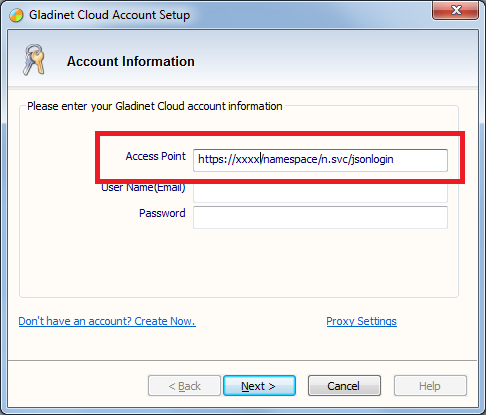
                        <li>Gladinet Cloud endpoint (can be hard-coded and hidden): _____https://cloud.acme.com__________________<br />
                            <img src="images/branding/temp/accesspoint.png" />
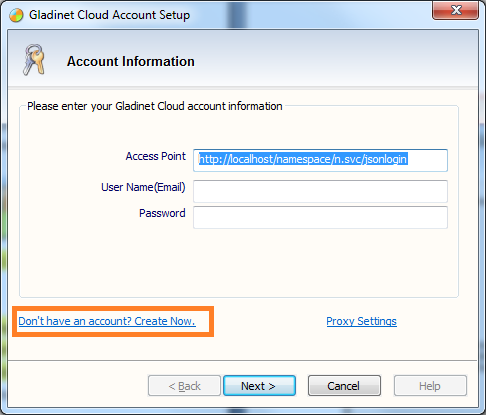
                        <li>Show Create Account Link?
                            <br />
                            <img src="images/branding/temp/accesspoint2.png" />
                        <li>Test Account
                            <ul>
                                <li>
                                User ID : _____________
                                <li>
                                password : ____________
                            </ul>
                        </li>
                        <li>Support Information:
                            <ul>
                                <li>
                                Email : ________support@gladinet.com_________________________
                                <li>
                                Phone : ____________________________________
                                <li>
                                Web site : ______http://www.gladinet.com_______________
                                <li>
                                Support URL: ___________________________
                            </ul>
                        </li>
                        <li>Setup File Name:
                            <ul>
                                <li>
                                ClientName_x86_xxx.exe (32-bit and internal version)
                                <li>
                                ClientName_x64_xxx.exe (64-bit and internal version)
                            </ul>
                        </li>
                        <li>Title Bar string for the management console. __Gladinet Management Console___</li>
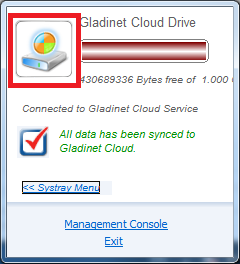
                        <li>System Tray Dialog Drive Icon:
                            <img src="images/branding/temp/Drv64_64.bmp" />
                            <ul>
                                <li>64x64 bmp format, with border, prefer round border.</li>
                            </ul>
                            <br />
                            <img src="images/branding/temp/systraydrive.png" />
                        </li>
                    </ul>
                    <a name="ios"></a>
                    <h2>
                        iOS Application Branding</h2>
                    <p>
                        <div class="checkout">
                            For iOS Application, you will first need to apply for an iOS Developer account in
                            your company's name. You will pay Apple $99/year for the developer account.
                            After that, you have an iTunes Connect account to upload the iOS application bundle
                            to your account inside the Apple App Store. The application will show up under your
                            company's name, instead of Gladinet's name. Check out the <a href="https://developer.apple.com/programs/ios/">
                                iOS Developer Program</a>.
                        </div>
                    </p>
                    <ul>
                        <li>260x50 Logo: PNG format, with transparent background. This logo will show at the
                            iOS app login page

                            <br />
                            <img src="images/branding/temp/Full_Logo_Black_Glow.png" />
                        </li>
                        <li>1024x1024 product icon (This icon will be used for iTune Connect Application Publishing)
                        </li>
                        <li>Testing accounts (iOS Application submission requires a test account for review
                            purpose) </li>
                    </ul>
                </p>
                <a name="droid"></a>
                <h2>
                    Android Application Branding</h2>
                <p>
                    <div class="checkout">
                        You will need to acquire a Google Play account first. We will provide 2 APK files.
                        First APK file is signed by Gladinet so you can test it on your testing device and
                        capture screenshots for Google Play application publishing. The second APK file
                        is an un-signed APK file that you can sign yourself. Check out <a href="http://developer.android.com/tools/publishing/app-signing.html">
                            Android Signing your application</a>.</div>
                    <ul>
                        <li>512x512 Application Launch icon. (Normally this can be derived from the 1024x1024
                            icon) </li>
                        <li>Product icon in the size of 32x32, 48x48, 72x72, 96x96. (Normally this can be derived
                            from the 1024x1024 icon) </li>
                    </ul>
                </p>
                <a name="mac"></a>
                <h2>
                    Mac OS X Application Branding</h2>
                <p>
                    Mac desktop Application branding will use the same artwork from Windows, with the
                    following additions.
                    <ul>
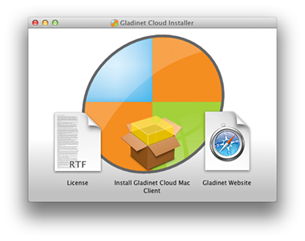
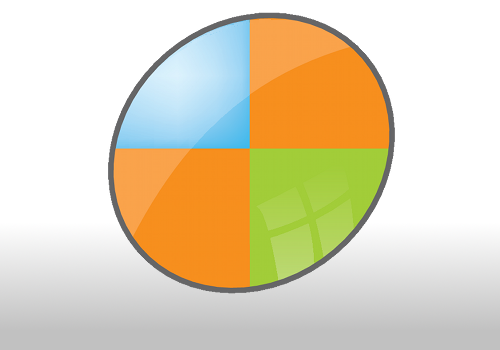
                        <li>Installer (DMG file) background image. (Width=500, Height=350, format=png)
                            <br />
                            <img src="images/branding/temp/mac-dmg-background.png" /><br />
                            <img src="images/branding/temp/mac-dmg.png" />
                        </li>
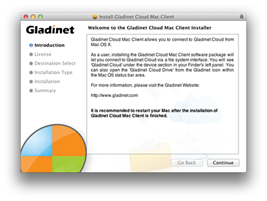
                        <li>Installer (PKG) background (width=620, height=418, format=png)
                            <br />
                            Requirements:
                            <ul>
                                <li>The logo on the background needs to be at the top-left, and width< 100 </li>
                                <li>The middle part will have text box (From Mac OS X) on top, so recommend the background
                                    image being light so have enough contrast to focus on the text.</li>
                            </ul>
                            <img src="images/branding/temp/mac-pkg-background.png" border="1" style="border: 1px solid #ccc;" />
                            <br />
                            <img src="images/branding/temp/mac-pkg.png" />
                        </li>
                    </ul>
                </p>
                <h2>
                    Branding Example Artworks</h2>
                <p>
                    Click <a class="normal" href="branding.zip">this link to download the zip file</a>
                that contains an example branding image files including png, bmp, ico and icns files.
                Please modify the bitmaps in place in its original format and send the updated zip
                file back to support@gladinet.com with the above branding template filled in.
                <p>
                    Please reference <a href="Product.aspx">product page</a> for other documentation.</p>


</asp:Content>