﻿<%@ Page Language="C#" AutoEventWireup="true" CodeBehind="AWSSecureFileSharing.aspx.cs"
    Inherits="cloudenterprise.AWSSecureFileSharing" MasterPageFile="Site.master" %>

<asp:Content ID="Content1" runat="server" ContentPlaceHolderID="ContentTitle">
   Secure File Sharing with Amazon Web Services
</asp:Content>
<asp:Content ID="Content2" runat="server" ContentPlaceHolderID="SEOBlock">
    <meta name="keywords" content="AMI, AWS, OwnCloud, OwnCloud alternative, Novell Filr, cloud storage, private cloud, cloud enterprise, enterprise cloud,  self-hosted dropbox, self-hosted owncloud, online storage, cloud storage, cloud storage client" />
    <meta name="description" content="CentreStack (Gladinet Cloud Enterprise) provides cloud storage related solutions for enterprise to self-host a secure Amazon Web Service based secure, private file sync and share solution. This white paper focuses on Amazon EC2 deployment." />
</asp:Content>
<asp:Content ID="Content" runat="server" ContentPlaceHolderID="MainContent">
    <style type="text/css">
        .content
        {
            padding-bottom: 12px;
            vertical-align: top;
        }
        .ctitle
        {
            vertical-align: top;
            background-color:#e0e0e0;
        }
    </style>
    <a name='teams'></a>
    <table width="860" align="center" border="0" cellspacing="0" cellpadding="0" style="padding: 0px;">
        <tr>
            <td>
                &nbsp;
            </td>
        </tr>
        <tr>
            <td class="checkout" width="860" style="padding: 16px;">
                <a name='promo'></a>
                <table width="860" border="0" align="center" cellpadding="0" cellspacing="0" style="margin: 0px;
                    padding: 0px;">
                    <tr>
                        <td style="vertical-align: top; border-top: 0 solid #d0d0d0; text-align: center;">
                            <h1>
                                Secure File Sharing with Amazon Web Services</h1>
                        </td>
                    </tr>
                    <tr>
                        <td style="vertical-align: top; border-top: 0 solid #d0d0d0; text-align: center;
                            padding-top: 6px; padding-bottom: 16px;">
                            <span class="headsubtitle1">Provide a Dropbox-like Solution to Your Users with Security
                                and Control</span>
                        </td>
                    </tr>
                    <tr>
                        <td style="padding-left: 0px; padding-top: 16px; padding-bottom: 16px; font-size: 16px;">
                            <div class="toc" style="float: left;">
                                <b style="margin-left: 8px;">Useful Links</b><br />
                                <ul style="list-style-type: circle;">
                                    <li><a class="normal" href="http://www.gladinet.com/OnlineStorage/Features.aspx">Gladinet Features</a></li>
                                    <li><a class="normal" href="http://www.gladinet.com/OnlineStorage/GladinetDifference.aspx">The Gladinet Difference</a></li>
                                    <li><a class="normal" href="SuccessStories.aspx">Success Stories</a></li>
                                    <li><a class="normal" href="#Sharepoint">SharePoint Replacement</a></li>
                                    <li><a class="normal" href="#Migration">File Server Migration</a></li>
                                    <li><a class="normal" href="http://www.gladinet.com/compare.html">Gladinet vs Dropbox</a></li>
                                    <li><a class="normal" href="http://www.gladinet.com/compare.html">Gladinet vs Box</a></li>
                                    <li><a class="normal" href="http://www.gladinet.com/compare-gladinet-cloudberry.html">Gladinet vs CloudBerry</a></li>
                                    <li><a class="normal" href="http://www.gladinet.com/compare-gladinet-owncloud-egnyte.html">Gladinet vs ownCloud</a></li>
                                    <li><a class="normal" href="http://www.gladinet.com/compare-gladinet-owncloud-egnyte.html">Gladinet vs Egnyte</a></li>
                                    <li><a class="normal" href="http://www.gladinet.com/CloudEnterprise/features/Default.aspx">Cloud Enterprise Overview</a></li>
                                </ul>
                                <b style="margin-left: 8px;">Picture Gallery Links</b>
                                <ul style="text-align: left; list-style-type: circle;">
                                    <li><a class="normal" href="features/msp-enterprise-web-access.aspx">Web Browser Access</a></li>
                                    <li><a class="normal" href="features/msp-enterprise-windows-desktop.aspx">Windows Desktop
                                        Access</a></li>
                                    <li><a class="normal" href="features/msp-enterprise-macosx.aspx">Mac OS X Desktop Access</a></li>
                                    <li><a class="normal" href="features/msp-enterprise-mobile-access.aspx">Mobile Access</a></li>
                                    <li><a class="normal" href="features/msp-enterprise-ios-phone-pad.aspx">iOS Access</a></li>
                                    <li><a class="normal" href="features/msp-enterprise-android.aspx">Android Access</a></li>
                                    <li><a class="normal" href="features/msp-enterprise-windows-phone.aspx">Windows Phone
                                        8 Access</a></li>
                                    <li><a class="normal" href="features/msp-enterprise-windows-store-app.aspx">Windows
                                        Surface (RT) Access</a></li>
                                    <li><a class="normal" href="features/msp-enterprise-file-server.aspx">File Server Access</a></li>
                                    <li><a class="normal" href="features/msp-enterprise-online-collaboration.aspx">Online
                                        Collaboration</a></li>
                                    <li><a class="normal" href="features/msp-enterprise-file-and-folder-share.aspx">File
                                        and Folder Share</a> </li>
                                    <li><a class="normal" href="features/msp-enterprise-file-server-migration.aspx">Migrate
                                        File Server</a> </li>
                                    <li><a class="normal" href="features/msp-enterprise-unify-branch-office.aspx">Unify
                                        Branch Office File Structure</a></li>
                                </ul>
                                <b style="margin-left: 8px;">Video Gallery Links</b>
                                <ul style="text-align: left; list-style-type: circle;">
                                    <li><a class="normal" href="features/VideoGallery.aspx">Video Links</a></li>
                                </ul>
                                <a style="margin-left: 8px;" href="http://gladinet.blogspot.com/2013/01/host-your-own-sync-share-solution-in.html">
                                    <img src="../images/tryitbtn.jpg" border="0" /></a>
                            </div>
                            <a name="intro"></a>
                            <p>
                                <img src="images/ami/diagram.jpg" width="488" /></p>
                                    <table width="58%" border="0" cellspacing="0" cellpadding="0">
                                            <tr>
                                                <td height="24" width="42">
                                                    <img src="../images/icon02.gif" class="tick">
                                                </td>
                                                <td style="font-family: Verdana,Arial,Helvetica,sans-serif; padding: 0px; line-height: 1.6em;
                                                    font-size: 12px; color: #404041;">
                                                    Secure file sharing from your private AWS environment
                                                    that is easy to setup.</td>
                                            </tr>
                                            <tr>
                                                <td height="24">
                                                    <img src="../images/icon02.gif" class="tick">
                                                </td>
                                                <td style="font-family: Verdana,Arial,Helvetica,sans-serif; padding: 0px; line-height: 1.6em;
                                                    font-size: 12px; color: #404041;">
                                                    Access your private S3 account from any device
                                                    with On-Demand synchronization
                                                </td>
                                            </tr>
                                            <tr>
                                                <td height="24">
                                                    <img src="../images/icon02.gif" class="tick">
                                                </td>
                                                <td style="font-family: Verdana,Arial,Helvetica,sans-serif; padding: 0px; line-height: 1.6em;
                                                    font-size: 12px; color: #404041;">
                                                    Deep Active Directory integration. Get started with your existing users in no time.
                                                </td>
                                            </tr>
                                            <tr>
                                                <td height="24" width="42">
                                                    <img src="../images/icon02.gif" class="tick">
                                                </td>
                                                <td style="font-family: Verdana,Arial,Helvetica,sans-serif; padding: 0px; line-height: 1.6em;
                                                    font-size: 12px; color: #404041;">
                                                    Easy migration to the cloud. Move existing file shares and permissions to the
                                                    cloud.</td>
                                            </tr>
                                            <tr>
                                                <td height="24">
                                                    <img src="../images/icon02.gif" class="tick">
                                                </td>
                                                <td style="font-family: Verdana,Arial,Helvetica,sans-serif; padding: 0px; line-height: 1.6em;
                                                    font-size: 12px; color: #404041;">
                                                    Retire on-premise servers or keep them for offline access</td>
                                            </tr>
                                            <tr>
                                                <td height="24">
                                                    <img src="../images/icon02.gif" class="tick">
                                                </td>
                                                <td style="font-family: Verdana,Arial,Helvetica,sans-serif; padding: 0px; line-height: 1.6em;
                                                    font-size: 12px; color: #404041;">
                                                    Simple deployment on a small instance in EC2 supports thousands of users</td>
                                            </tr>
                                            <tr>
                                                <td colspan="2" align="right" style="padding-top: 10px">
                                                    <a href="AWSVPCSyncShare.aspx"
                                                        title="Setting up the solution from Gladinet AMI image">
                                                        AWS AMI Quick Start Guide</a>&nbsp;&nbsp;
                                                </td>
                                            </tr>
                                            <tr>
                                                <td colspan="2" align="right" style="padding-top: 10px">
                                                    <a href="AWSEC2SyncShare.aspx"
                                                        title="Setting up the solution from Amazon Windows 2008 R2 image">
                                                        AWS EC2 Quick Start Guide</a>&nbsp;&nbsp;
                                                </td>
                                            </tr>
                                        </table>
                            <h2>
                                What is CentreStack (Gladinet Cloud Enterprise)?</h2>
                            <p>
                                <img src="features/images/access.png" style="float: left; padding-right: 8px; padding-bottom: 8px;" /> CentreStack
                                allows enterprise to privately deploy a secure file sharing
                                solution with access from any device (browser, mobile, desktop and file servers).</p>
                            <p>
                                It is a self-hosted dropbox alternative that enterprises can trust.&nbsp; </p>

                            <h2>
                                &nbsp;</h2>
                            <h2>
                                Why Self-Hosted?
                            </h2>
                            <p>
                                Many
                                enterprises are now faced with the Dropbox problem. Employees use Dropbox for
                                file sharing, synchronization and mobile access, but IT departments need to
                                maintain control over the security and location of their data. There may also be
                                regulatory restrictions which create the need for a secure, self-hosted
                                solution that has the same file sync and share features as those from public domain.
                            </p>
                            <p>
                                CentreStack solves that problem and provides a simple, convenient
                                migration path for existing servers and data.</p>
                            <h2> <a name="Sharepoint">
                                Simpler, Cheaper Alternative to Sharepoint</a></h2>
                            <p>
                                For secure file sharing, CentreStack is a simpler, cheaper alternative to Sharepoint.
                                Sharepoint is a powerful solution but if you just want secure file sharing, you can save time and money.
                                For example, a typical Sharepoint deployment may require several servers while a simple Gladinet deployment
                                on a single Amazon EC2 small instance can provide secure, private file sharing to thousands of users with access from
                                mapped drives and mobile devices.
                            </p>

                            <h2>
                                <a name="Migration">File Server Migration</a>
                            </h2>
                            <p>
                                Many enterprises are faced with the challenge of migrating their data to the cloud without disturbing
                                existing users or spending lots of time reconfiguring access permissions, creating new users or training existing
                                users to use cloud applications and services. CentreStack makes this migration easy. It integrates
                                with Active Directory to use your existing users and migrates your file shares to the cloud with their existing
                                permissions. And users can continue to access their data using the tools they are used to (file shares, Windows Explorer,
                                Mac Finder, etc...)
                            </p>

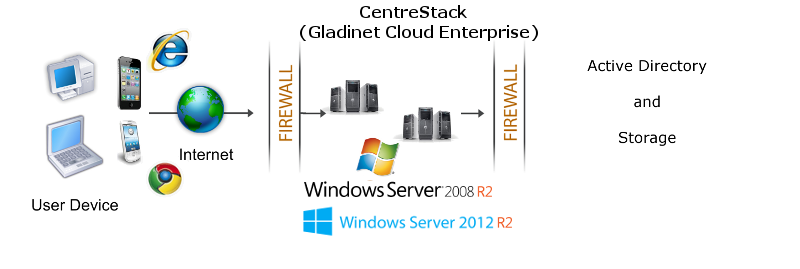
                            <h2>
                                CentreStack Solution
                            </h2>
                            <img src="images/dmz.png" />
                            <h2>
                                Summary</h2>
                            <p>
                                CentreStack integrates with Active Directory and your private AWS
                                infrastructure to create a secure, self-hosted dropbox alternative. Try it now
                                to regain control.
                            </p>
                            <p>
                                For more information, please contact Gladinet Support @ enterprise@gladinet.com
                                or visit <a class="normal" href="http://www.gladinet.com">http://www.gladinet.com</a>
                            </p>
                            <h2>
                                See Also</h2>
                            <p>
                                <a href="SyncShare.aspx">Installable Enterprise Sync &amp; Share Solution</a>
                            </p>
                        </td>
                    </tr>
                </table>
            </td>
        </tr>
        <tr>
            <td>
                <table>
                    <tr>
                        <td>
                            &nbsp;
                        </td>
                    </tr>
                </table>
            </td>
        </tr>
        <tr>
            <td>
            </td>
        </tr>
    </table>
    <table>
        <tr>
            <td>
                &nbsp;
            </td>
        </tr>
    </table>
    <table width="860" border="0" align="center" cellpadding="0" cellspacing="0">
        <tr>
            <td colspan="2">
                &nbsp;
            </td>
        </tr>
        <tr>
            <td class="style13">
                <span>Additional questions?&nbsp; Contact Gladinet Support at support@gladinet.com.</span>
            </td>
        </tr>
    </table>
</asp:Content>