<!DOCTYPE html>
<html lang="en">
  <head>
    <meta charset="utf-8">
    <meta http-equiv="X-UA-Compatible" content="IE=edge">

    <title>
        
    Online Storage - Share Files and Folders with Your Team Members Anytime, Anywhere

    </title>

	 
        <meta name="keywords" content="cloud storage, private cloud, cloud enterprise, enterprise cloud,  cloud desktop, cloud gateway, cloud agent, Cloud computing environment, map drive, backup, online backup,  online storage, cloud storage, cloud storage client, amazon s3, skydrive, HP docs, HP picasa, emc atmos, synaptic storage, nirvanix, mezeo, Peer1 CloudOne, HP Storage for Developer" />
        <meta name="description" content="GLADINET cloud enterprise provides cloud storage related solutions for enterprise with backup, access, sync, share, collaboration, connect, identity & control management." />
    

    <link href='http://fonts.googleapis.com/css?family=Open+Sans:700italic,800italic,400,400italic,700,300' rel='stylesheet' type='text/css'>
    <link href='http://fonts.googleapis.com/css?family=Lato:400,700' rel='stylesheet' type='text/css'>
    <link href='http://fonts.googleapis.com/css?family=Oswald:400,300,700' rel='stylesheet' type='text/css'>

    <link href="css/landing3.css" rel="stylesheet" />
    <link href="/assets/css/bootstrap.min.css" rel="stylesheet">
    <link href="/assets/fancybox/source/jquery.fancybox.css?v=2.1.5" rel="stylesheet">
    <link href="/assets/css/app.min.css" rel="stylesheet">

    <!-- HTML5 shim and Respond.js IE8 support of HTML5 elements and media queries -->
    <!--[if lt IE 9]>
      <script src="/assets/js/html5shiv.js"></script>
      <script src="/assets/js/respond.min.js"></script>

      <link rel="stylesheet" type="text/css" href="/assets/css/ie8.css" />
    <![endif]-->

  </head>

  <body>

    <nav class="navbar navbar-static secondary" role="navigation">
      <div class="container">
        <div class="navbar-collapse collapse">
          <ul class="nav navbar-nav pull-right text-topMenu">
            <li><a href="/compare.html">compare</a></li>
            <li><a href="/ServiceProvider/features/VideoGallery.aspx">demos</a></li>
            <li><a href="/Reseller.html">partner</a></li>
            <li><a href="/price.html">pricing</a></li>
            <li><a href="/cloudenterprise/partner.aspx">contact</a></li>
            <li><a href="#" class="divider">&nbsp;</a></li>
            <li><a href="https://gcloud.gladinet.com/portal/loginpage.aspx">login</a></li>
            <li><a href="/CloudEnterprise/signup.aspx" class="signup">Download Enterprise Trial</a></li>
          </ul>
        </div><!--/.nav-collapse -->
      </div>
    </nav>

    <nav class="navbar navbar-default navbar-static primary text-dropdown">
          <div class="container">
              <div class="navbar-header">
                  <button type="button" class="navbar-toggle" data-toggle="collapse" data-target=".navbar-collapse">
                      <span class="sr-only">Toggle navigation</span>
                      <span class="icon-bar"></span>
                      <span class="icon-bar"></span>
                      <span class="icon-bar"></span>
                  </button>
                  <div class="navbar-logo"><a class="navbar-brand" href="http://www.gladinet.com" title="go home"></a></div>
              </div>
              <div class="collapse navbar-collapse js-navbar-collapse navbar-right">
                  <ul class="nav navbar-nav">
                      <li class="dropdown dropdown-large">
                          <a href="/team.html" class="dropdown-toggle text-menu">Team</a>

                          <ul class="dropdown-menu dropdown-menu-large row">
                              <li class="dropdown-capabilities team">
                                  <div class="dropdown-category text-dropdownCategory">capabilities</div>
                                  <ul class="text-dropdown">
                                      <li><a href="/personal.html">drive access</a></li>
                                      <li><a href="/personal.html#onlinebackup">online backup</a></li>
                                      <li><a href="/personal.html#fileshare">file share</a></li>
                                      <li><a href="/team.html">secure file sharing</a></li>
                                      <li><a href="/team.html#globalworkspace">global workspace</a></li>
                                      <li><a href="/team.html#filesynchronization">file synchronization</a></li>
                                      <li><a href="/team.html#drivemapping">drive mapping</a></li>
                                      <li><a href="/team.html#filelocking">file locking</a></li>
                                  </ul>
                              </li>
                              <li class="dropdown-solutions">
                                  <div class="dropdown-category text-dropdownCategory">solutions</div>
                                  <ul class="text-dropdown">
                                      <li><a href="/OnlineStorage/">what can Gladinet do for my business</a></li>
                                      <li><a href="/OnlineStorage/Desktop.aspx">drive access to online storage</a></li>
									  <li><a href="/OnlineStorage/Share.aspx">share local & online files to friends</a></li>
                                      <li><a href="/OnlineStorage/Backup.aspx">backup local files to online storage</a></li>
                                      <li><a href="/OnlineStorage/OnlineCollaboration.aspx">simple online collaboration</a></li>
                                      <li><a href="/OnlineStorage/FolderShare.aspx">folder share across the internet</a></li>
                                      <li><a href="/OnlineStorage/DesktopIntegration.aspx">seamless desktop integration</a></li>
                                      <li><a href="/OnlineStorage/BranchOffice.aspx">simplify branch office file structure</a></li>
                                      <li><a href="/OnlineStorage/Migration.aspx">seamless IT migration to cloud</a></li>
                                      <li><a href="/OnlineStorage/VirtualDesktop.aspx">virtual desktop friendly solution</a></li>
                                  </ul>
                              </li>
                              <li class="dropdown-serverSolutions">
                                  <div class="dropdown-category text-dropdownCategory">file server solutions</div>
                                  <ul class="text-dropdown">
                                      <li><a href="/cloudserver/OnlineAccess.aspx">online access to file server</a></li>
                                      <li><a href="https://www.gladinet.com/competitor-sharefile-alternative-replacement/">share file from file server</a></li>
                                      <li><a href="https://www.gladinet.com/file-server-cloud-remote-access/">migrate network share to cloud</a></li>
                                      <li><a href="/cloudserver/MobileAccess.aspx">mobile access to file Server </a></li>
                                      <li><a href="https://www.gladinet.com/hybrid-cloud-solutions-for-data-management/">hybrid cloud storage solution</a></li>
                                      <li><a href="/cloudserver/HybridLocalStorageCloudStorage.aspx">hybrid local/cloud storage solution</a></li>
                                      <li><a href="/cloudserver/FileServerRemoteAccess.aspx">easy remote access to File server</a></li>
                                      <li>
                                          <div class="dropdown-trialButton">
                                              <p class="trialButton-text text-dropdownTrialText">Gladinet Cloud Team Edition for simple, secure access to online storage.</p>
                                              <a href="/cloudplan.htm" class="tialButton-link btn btn-primary">1.1TB Free Trial</a>
                                          </div>
                                      </li>
                                  </ul>
                              </li>
                          </ul>
                      </li>


                      <li class="dropdown dropdown-large">
                          <a href="/enterprise.html" class="dropdown-toggle text-menu">Enterprise</a>

                          <ul class="dropdown-menu dropdown-menu-large row">
                              <li class="dropdown-capabilities enterprise">
                                  <div class="dropdown-category text-dropdownCategory">capabilities</div>
                                  <ul class="text-dropdown">
                                      <li class="dropdown-header">team plus:</li>
                                      <li><a href="/enterprise.html">private file sharing</a></li>
                                      <li><a href="/enterprise.html#selfhosting">self hosting</a></li>
                                      <li><a href="/enterprise.html#adintegration">ad integration</a></li>
                                      <li><a href="/enterprise.html#openstackintegration">open stack integration</a></li>
                                      <li><a href="/enterprise.html#hybridcloud">hybrid cloud</a></li>
                                  </ul>
                              </li>
                              <li class="dropdown-solutions">
                                  <div class="dropdown-category text-dropdownCategory">solutions</div>
                                  <ul class="text-dropdown">
                                      <li class="dropdown-header">team plus:</li>
                                      <li><a href="/CloudEnterprise/OnlineAccess.aspx">online access to private cloud</a></li>
                                      <li><a href="/CloudEnterprise/HomeDirectoryOnline.aspx">online access to home directory</a></li>
                                      <li><a href="/CloudEnterprise/MobileAccess.aspx">mobile access to file server</a></li>
                                      <li><a href="/CloudEnterprise/SyncShare.aspx">installable sync & share solution</a></li>
                                      <li><a href="/CloudEnterprise/ActiveDirectory.aspx">active directory integration</a></li>
                                      <li><a href="/CloudEnterprise/PrivateCloud.aspx">existing IT for private cloud</a></li>
                                      <li><a href="/CloudEnterprise/HomeDirectoryDropbox.aspx">dropbox-like access</a></li>
                                      <li><a href="/CloudEnterprise/AWSSecureFileSharing.aspx">AWS secure file sharing</a></li>
                                      <li><a href="/CloudEnterprise/HPCSSecureFileSharing.aspx">HP CloudSystem secure file sharing</a></li>
                                  </ul>
                              </li>
                              <li class="dropdown-serverSolutions">
                                  <div class="dropdown-category text-dropdownCategory">file server solutions</div>
                                  <ul class="text-dropdown">
                                      <li><a href="/cloudserver/OnlineAccess.aspx">online access to file server</a></li>
                                      <li><a href="https://www.gladinet.com/competitor-sharefile-alternative-replacement/">share file from file server</a></li>
                                      <li><a href="https://www.gladinet.com/file-server-cloud-remote-access/">migrate network share to cloud</a></li>
                                      <li><a href="/cloudserver/MobileAccess.aspx">mobile access to file Server </a></li>
                                      <li><a href="https://www.gladinet.com/hybrid-cloud-solutions-for-data-management/">hybrid cloud storage solution</a></li>
                                      <li><a href="/cloudserver/HybridLocalStorageCloudStorage.aspx">hybrid local/cloud storage solution</a></li>
                                      <li><a href="/cloudserver/FileServerRemoteAccess.aspx">easy remote access to File server</a></li>
                                      <li>
                                          <div class="dropdown-trialButton">
                                              <p class="trialButton-text text-dropdownTrialText">Gladinet Enterprise 90 Day Trial</p>
                                              <a href="/cloudenterprise/signup.aspx" class="tialButton-link btn btn-primary">Sign Up</a>
                                          </div>
                                      </li>
                                  </ul>
                              </li>
                          </ul>
                      </li>
                      <li class="dropdown dropdown-large">
                          <a href="/serviceprovider.html" class="dropdown-toggle text-menu">Service Provider</a>

                          <ul class="dropdown-menu dropdown-menu-large row">
                              <li class="dropdown-capabilities serviceprovider">
                                  <div class="dropdown-category text-dropdownCategory">capabilities</div>
                                  <ul class="text-dropdown">
                                      <li class="dropdown-header">enterprise plus:</li>
                                      <li><a href="/serviceprovider.html">multi tenant</a></li>
                                      <li><a href="/serviceprovider.html#brandable">brandable on premise</a></li>
                                  </ul>
                              </li>
                              <li class="dropdown-solutions">
                                  <div class="dropdown-category text-dropdownCategory">solutions</div>
                                  <ul class="text-dropdown">
                                      <li class="dropdown-header">enterprise plus:</li>
                                      <li><a href="/ServiceProvider/CloudSolutionForMSP.aspx#whitelabel">white-labeled & self-hosted solution</a></li>
                                      <li><a href="/ServiceProvider/SyncShare.aspx">multi-tenant installable sync & share</a></li>
                                      <li><a href="/serviceprovider/selfhosteddropbox.aspx">self-hosted dropbox alternative</a></li>
                                  </ul>
                              </li>
                              <li class="dropdown-serverSolutions">
                                  <div class="dropdown-category text-dropdownCategory">&nbsp;</div>
                                  <ul class="text-dropdown">
                                      <li>
                                          <div class="dropdown-trialButton">
                                              <p class="trialButton-text text-dropdownTrialText">
                                                  Gladinet for Service Providers<br>
                                                  90 Day Trial
                                              </p>
                                              <a href="/serviceprovider/signup.aspx" class="tialButton-link btn btn-primary">Sign Up</a>
                                          </div>
                                      </li>
                                  </ul>
                              </li>
                          </ul>
                      </li>

<li><a href="#" class="divider">&nbsp;l</a></li>
					  <li class="dropdown dropdown-large">
                          <a href="/cloud-file-server.html" class="dropdown-toggle text-menu">Cloud File Server</a>

                          <ul class="dropdown-menu dropdown-menu-large row">
                              <li class="dropdown-capabilities fileserversolutions">
                                  <div class="dropdown-category text-dropdownCategory">capabilities</div>
                                  <ul class="text-dropdown">
                                      <li class="dropdown-header">with enterprise:</li>
                                      <li><a href="/cloud-file-server.html">cloud enable file server</a></li>
                                      <li><a href="/cloud-file-server.html#hybridcloudfileserver">hybrid cloud file server</a></li>
                                      <li><a href="/cloud-file-server.html#globalworkspace">global workspace</a></li>
                                      <li><a href="/cloud-file-server.html#vpnreplacement">vpn replacement</a></li>
                                  </ul>
                              </li>
                              <li class="dropdown-solutions">
                                  <div class="dropdown-category text-dropdownCategory">solutions</div>
                                  <ul class="text-dropdown">
                                      <li class="dropdown-header">with enterprise:</li>
                                      <li><a href="/CloudEnterprise/HomeDirectoryOnline.aspx">online access to home directory</a></li>
                                      <li><a href="/CloudEnterprise/MobileAccess.aspx">mobile access to file server</a></li>
                                      <li><a href="/CloudEnterprise/SyncShare.aspx">installable sync & share solution</a></li>
                                      <li><a href="/CloudEnterprise/ActiveDirectory.aspx">active directory integration</a></li>
                                      <li><a href="/CloudEnterprise/PrivateCloud.aspx">file server as private cloud</a></li>
                                      <li><a href="/CloudEnterprise/HomeDirectoryDropbox.aspx">dropbox-like access</a></li>
                                  </ul>
                              </li>
                              <li class="dropdown-serverSolutions">
                                  <div class="dropdown-category text-dropdownCategory">file server solutions</div>
                                  <ul class="text-dropdown">
                                      <li><a href="/cloudserver/OnlineAccess.aspx">online access to file server</a></li>
                                      <li><a href="https://www.gladinet.com/competitor-sharefile-alternative-replacement/">share file from file server</a></li>
                                      <li><a href="https://www.gladinet.com/file-server-cloud-remote-access/">migrate network share to cloud</a></li>
                                      <li><a href="/cloudserver/MobileAccess.aspx">mobile access to file Server </a></li>
                                      <li><a href="https://www.gladinet.com/hybrid-cloud-solutions-for-data-management/">hybrid cloud storage solution</a></li>
                                      <li><a href="/cloudserver/HybridLocalStorageCloudStorage.aspx">hybrid local/cloud storage solution</a></li>
                                      <li><a href="/cloudserver/FileServerRemoteAccess.aspx">easy remote access to File server</a></li>
                                      <li>
                                          <div class="dropdown-trialButton">
                                              <p class="trialButton-text text-dropdownTrialText">Gladinet Enterprise 90 Day Trial</p>
                                              <a href="/cloudenterprise/signup.aspx" class="tialButton-link btn btn-primary">Sign Up</a>
                                          </div>
                                      </li>
                                  </ul>
                              </li>
                          </ul>
                      </li>
                  </ul>
              </div>
              <!-- /.nav-collapse -->
          </div>
      </nav>   


    <main class="legacy">

      <div class="container">
        <div class="row">
          <div class="col-xs-12">
            <div class="hero-static team">
              <div class="static-text">
                <h1>Gladinet <br> Team Edition</h1>
                <p>Simple, secure and seamless collaboration on any device. Hosted by Gladinet.</p>
              </div>

              <div class="static-button">
                <a href="/price.html" class="btn btn-primary btn-lg">Sign Up</a>
              </div>
            </div>
          </div>
          <div class="col-xs-12">
            <div class="subHero documentation">
              <div class="documentation-links">
                <a href="SolutionBrief.aspx">Solution Brief</a>
                <a href="Default.aspx">White Paper</a>
                <a href="Features.aspx">Features</a>
                <a href="GladinetDifference.aspx">The Difference</a>
              </div>
            </div>
          </div>
        </div>

        <section class="body">
          <div class="container">
            <div class="row">
              <div class="col-xs-12">

                <!-- body content here -->
                
    <style type="text/css">
        td.head
        {
            font-size: 18px;
            font-weight: bold;
            text-align: center;
            border-bottom: 1px solid;
            border-right: 1px solid;
            border-color: #29A5DC;
            padding-top: 8px;
            padding-bottom: 8px;
        }

        td.group
        {
            font-size: 18px;
            font-weight: bold;
            text-align: left;
            border-bottom: 2px solid;
            padding-top: 6px;
            border-color: #29A5DC;
            color: #666;
        }

        td.groupdesc
        {
            padding-left: 48px;
            padding-right: 32px;
            border-bottom: 1px dashed;
            border-color: #29A5DC;
            font-size: 12px;
            line-height: 18px;
        }

        td.comp
        {
            text-align: left;
            border-bottom: 1px dashed;
            border-left: 1px solid;
            border-color: #29A5DC;
            padding-top: 3px;
            padding-bottom: 3px;
            width: 586px;
        }
        td.desc
        {
            text-align: left;
            font-weight: bold;
            border-bottom: 1px dashed;
            border-color: #29A5DC;
            padding-left: 16px;
            vertical-align: top;
            padding-top: 8px;
        }

        td.g
        {
            background-color: #f0f0f0;
        }

        a.various
        {
            font-size: 12px;
            margin-left: 16px;
        }
    </style>
    <a name='teams'></a>
    <table width="860" align="center" border="0" cellspacing="0" cellpadding="0" style="padding: 0px;">
        <tr>
            <td>
                &nbsp;
            </td>
        </tr>
        <tr>
            <td class="checkout" width="860" style="padding: 16px;">
                <a name='promo'></a>
                <table width="860" align="center" border="0" cellspacing="0" cellpadding="0">
                    <tr>
                        <td colspan="2" class="group" style="text-align: center; border-bottom: 0px;">
                            <h1 style="text-align: center">
                                Gladinet Cloud Team Edition Features</h1>
                        </td>
                    </tr>
                    <tr>
                        <td colspan="2">
                            &nbsp;
                        </td>
                    </tr>
                    <tr>
                        <td class="group" colspan="2">
                            ACCESS YOUR FILES ANYWHERE <a name="access"></a>
                        </td>
                    </tr>
                    <tr>
                        <td class="groupdesc" colspan="2">
                            Gladinet Cloud Team Edition provides access methods from a web browser, native desktop
                            client, iOS App, Android App and file server. When you are on the road, you can
                            use the mobile applications to access your files. When you are in the office, you
                            can connect to your on-premise file server for access. You can also access them
                            from your desktop at home or use a web browser from any location on any client.
                        </td>
                    </tr>
                    <tr>
                        <td class="desc" style="width: 379px">
                            » Access all your files from any web browser
                        </td>
                        <td class="comp">
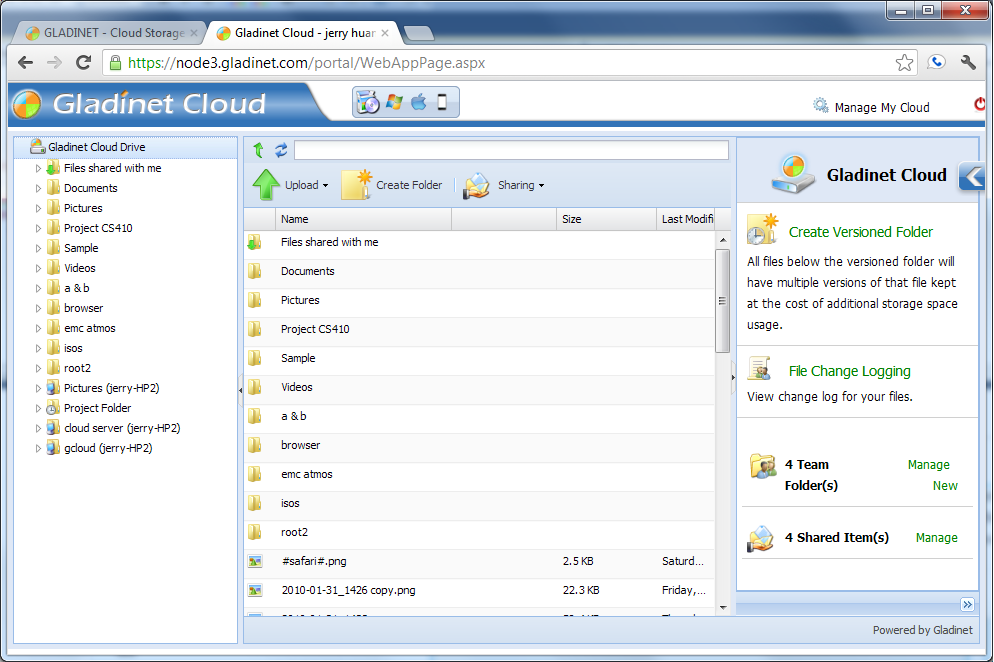
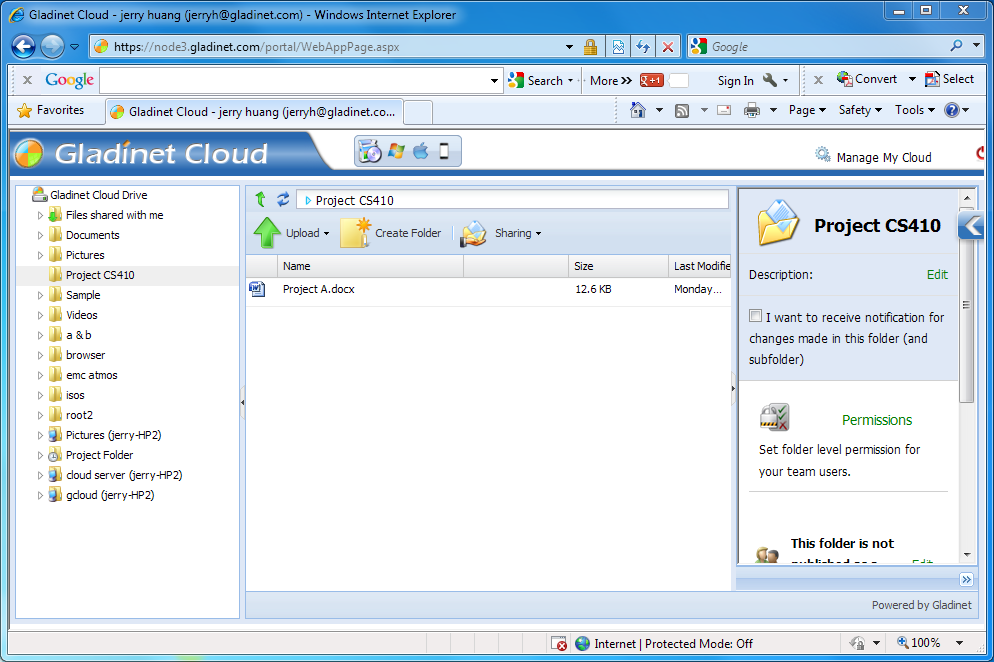
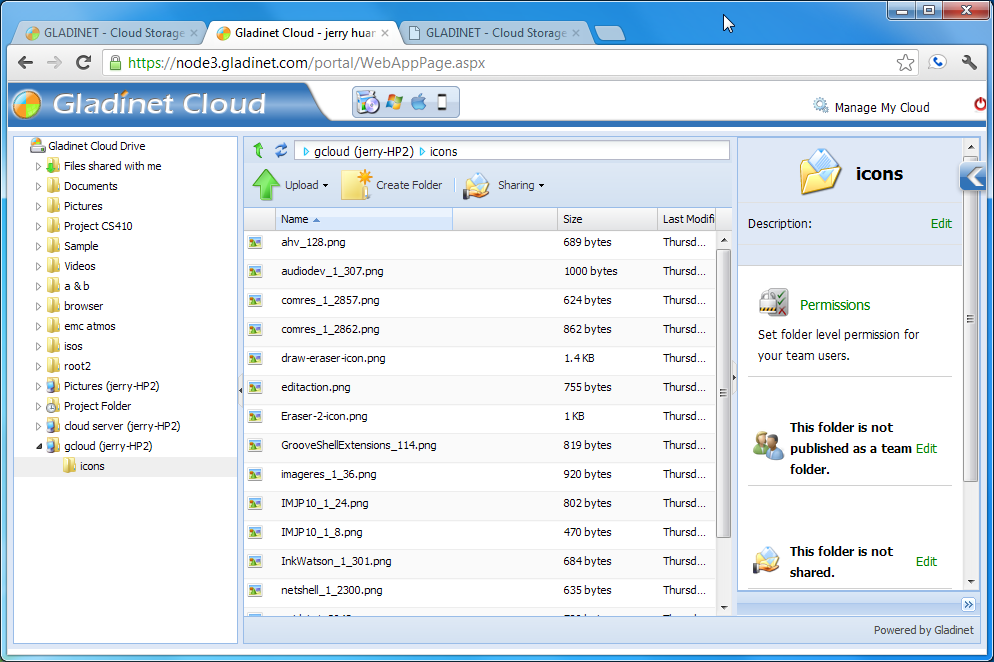
                            Gladinet Cloud can be accessed from all major browsers, including IE, Firefox, Chrome,
                            Safari and Opera.
                            <br />
                            <br />
                            <a id='A10' class="various iframe" href="images/product/webbrowser/wb1.png">
                                <img border="0" src="images/product/webbrowser/wb1_thumb.png" />
                            </a><a id='A11' class="various iframe" href="images/product/webbrowser/wb2.png">
                                <img border="0" src="images/product/webbrowser/wb2_thumb.png" />
                            </a><a id='A12' class="various iframe" href="images/product/webbrowser/wb3.png">
                                <img border="0" src="images/product/webbrowser/wb3_thumb.png" />
                            </a>
                        </td>
                    </tr>
                    <tr>
                        <td class="desc" style="width: 379px">
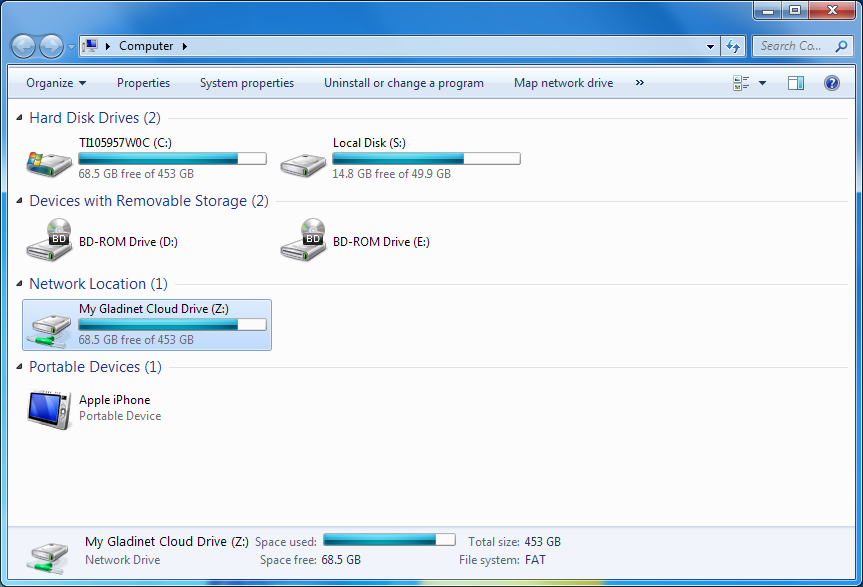
                            &raquo; Map your storage account as a network drive
                        </td>
                        <td class="comp">
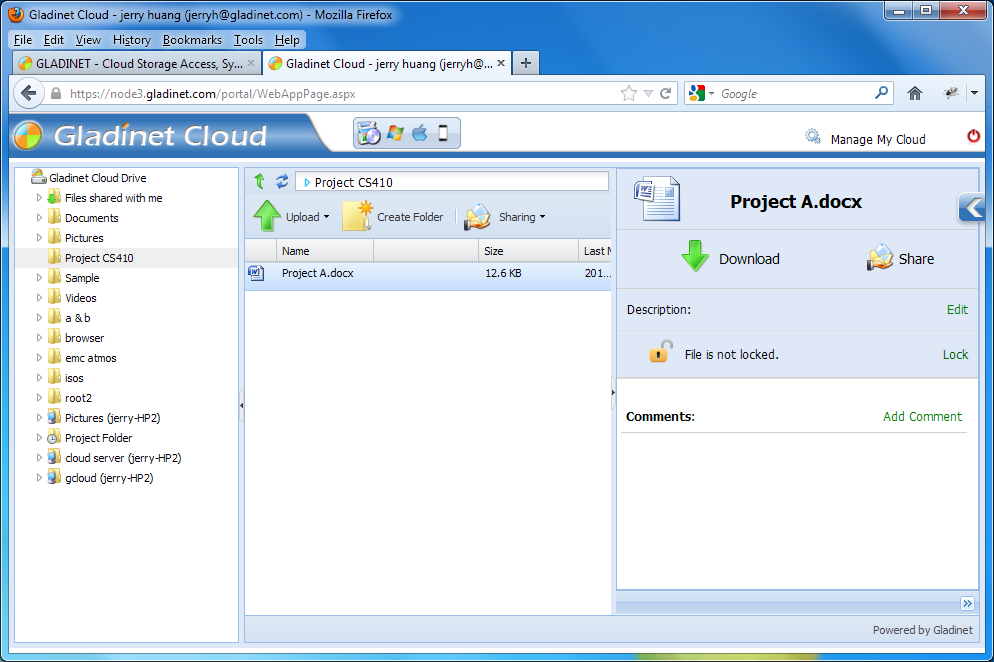
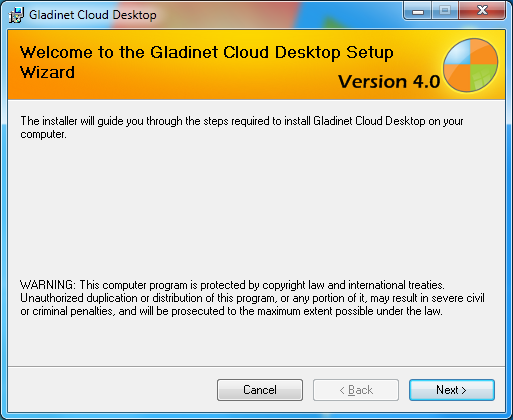
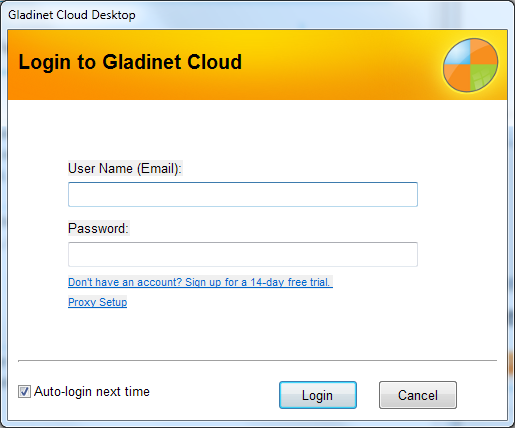
                            Having a drive letter on your desktop for cloud storage access is very easy to understand
                            and use.<br />
                            <br />
                            <a id="A13" class="various iframe" href="images/product/desktop/ds1.png">
                                <img border="0" src="images/product/desktop/ds1_thumb.png" />
                            </a><a id="A14" class="various iframe" href="images/product/desktop/ds2.png">
                                <img border="0" src="images/product/desktop/ds2_thumb.png" />
                            </a><a id="A15" class="various iframe" href="images/product/desktop/ds3.png">
                                <img border="0" src="images/product/desktop/ds3_thumb.png" />
                            </a><a id="A16" class="various iframe" href="images/product/desktop/ds4.png">
                                <img border="0" src="images/product/desktop/ds4_thumb.png" />
                            </a>
                        </td>
                    </tr>
                    <tr>
                        <td class="desc" style="width: 379px">
                            &raquo; Access your files from your mobile device
                        </td>
                        <td class="comp">
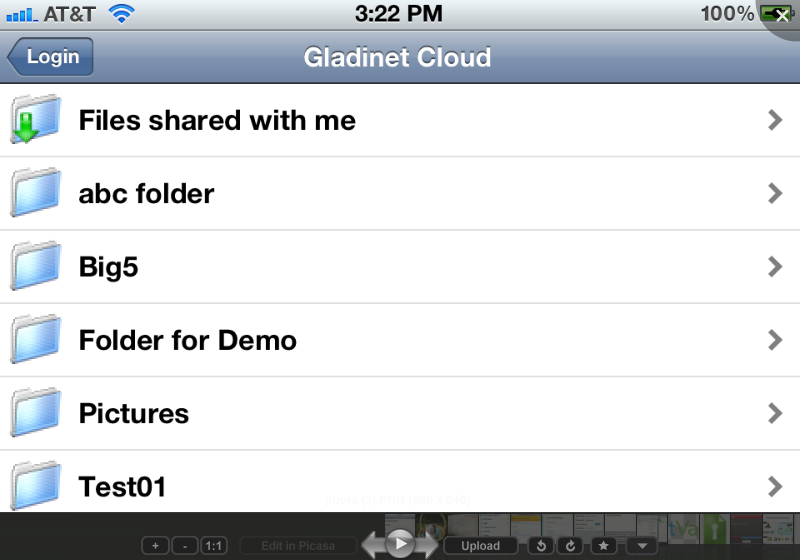
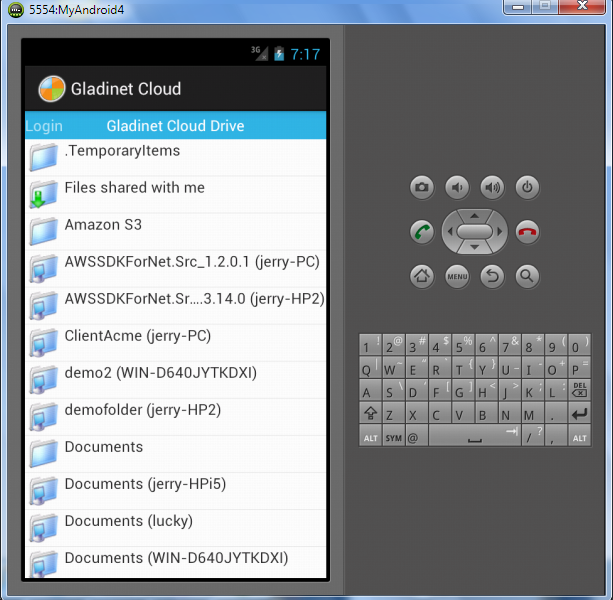
                            You can access Gladinet Cloud from your iPhone, iPad, Android or Windows Phone 8 devices with native
                            applications.
                            <br />
                            <br />
                            <a id="A17" class="various iframe" href="images/product/mobile/iphone.png">
                                <img border="0" src="images/product/mobile/iphone_thumb.png" />
                            </a><a id="A18" class="various iframe" href="images/product/mobile/android.png">
                                <img border="0" src="images/product/mobile/android_thumb.png" />
                            </a>
                             <img border="0" src="images/mobilelogo.jpg" style="float:right;" />
                        </td>
                    </tr>
                    <tr>
                        <td class="desc" style="width: 379px">
                            &raquo; Mount your storage account as a file server volume
                        </td>
                        <td class="comp ">
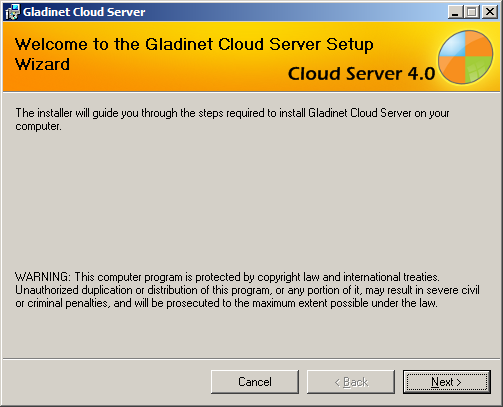
                            You can install Gladinet Cloud Server on your existing file server to seamlessly
                            migrate it to the cloud.
                            <br />
                            <a id="A30" class="various iframe" href="images/product/server/sr3.png">
                                <img border="0" src="images/product/server/sr3_thumb.png" />
                            </a><a id="A31" class="various iframe" href="images/product/server/sr4.png">
                                <img border="0" src="images/product/server/sr4_thumb.png" />
                            </a><a id="A32" class="various iframe" href="images/product/server/sr5.png">
                                <img border="0" src="images/product/server/sr5_thumb.png" />
                            </a><a id="A33" class="various iframe" href="images/product/server/sr6.png">
                                <img border="0" src="images/product/server/sr6_thumb.png" />
                            </a>
                        </td>
                    </tr>
                    <tr>
                        <td colspan="2">
                            &nbsp;
                        </td>
                    </tr>
                    <tr>
                        <td class="group" colspan="2">
                            SEAMLESSLY MIGRATE LOCAL FOLDERS TO CLOUD STORAGE <a name="attach"></a>
                        </td>
                    </tr>
                    <tr>
                        <td class="groupdesc" colspan="2">
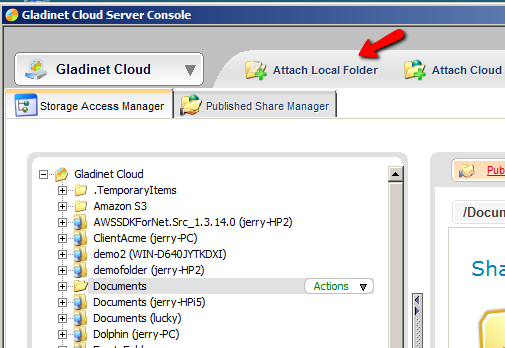
                            Gladinet provides unique synchronization technology that allows you to attach local
                            folders to cloud storage. Attaching a folder means that its contents immediately
                            become accessible to any device from any location (even before the sync is finished).
                            It also means that the attached folder will be synchronized with the cloud and any
                            changes made in the cloud from a remote mobile device will be synchronized back
                            to the attached folder. This is a powerful solution with no bulk ingestion roadblocks.
                        </td>
                    </tr>
                    <tr>
                        <td class="desc" style="width: 379px">
                            &raquo; Sync ANY local folder to cloud storage
                        </td>
                        <td class="comp">
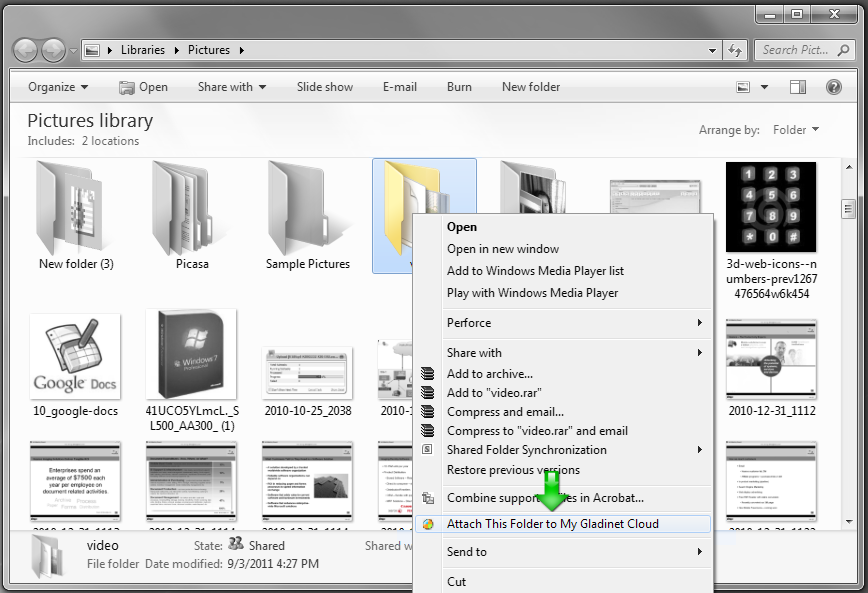
                            You can right click any local folder and select &quot;Attach to Gladinet Cloud&quot;.
                            The attached local folder will be synchronized with the cloud.&nbsp;
                            <br />
                            <br />
                            <a id="A1" class="various iframe" href="images/product/sync/sy1.png">
                                <img border="0" src="images/product/sync/sy1_thumb.png" />
                            </a><a id="A2" class="various iframe" href="images/product/sync/sy2.png">
                                <img border="0" src="images/product/sync/sy2_thumb.png" />
                            </a>
                        </td>
                    </tr>
                    <tr>
                        <td class="desc" style="width: 379px">
                            &raquo; Instant Migration
                        </td>
                        <td class="comp">
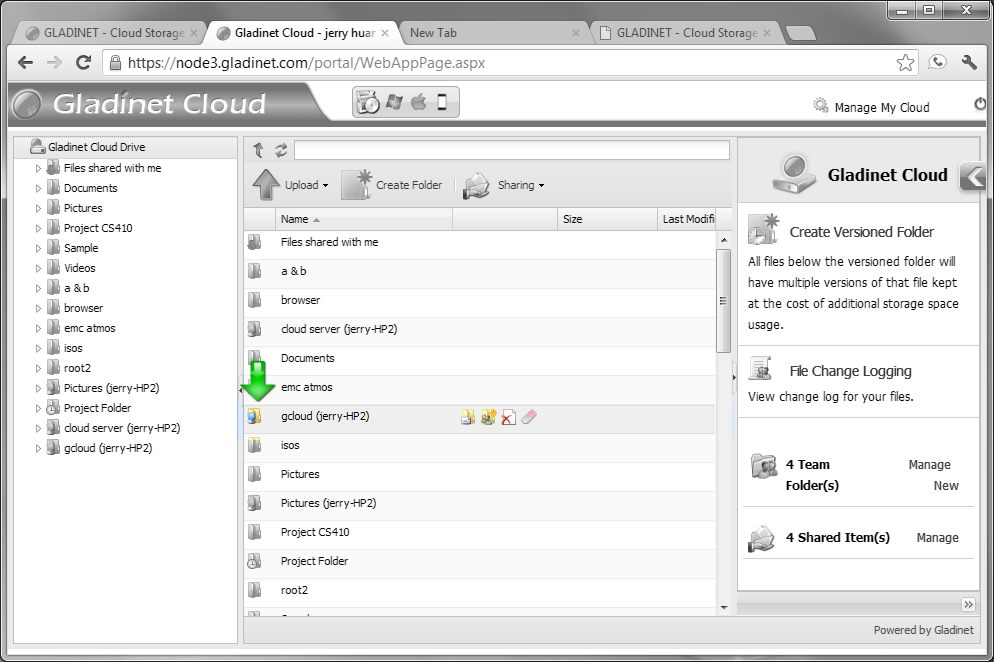
                            After you attach a local folder to your cloud storage account, it will immediately
                            appear in your Gladinet Cloud web portal and all Gladinet clients. While the sync
                            may still be happening in the background, you can start browsing the folder structure
                            and you will be able to randomly access any file - even before the synchronization
                            is complete.
                            <br />
                            <br />
                            <a id="A3" class="various iframe" href="images/product/sync/sy3.png">
                                <img border="0" src="images/product/sync/sy3_thumb.png" />
                            </a>
                        </td>
                    </tr>
                    <tr>
                        <td class="desc" style="width: 379px">
                            &raquo; Unify file server structure from multi-site
                        </td>
                        <td class="comp">
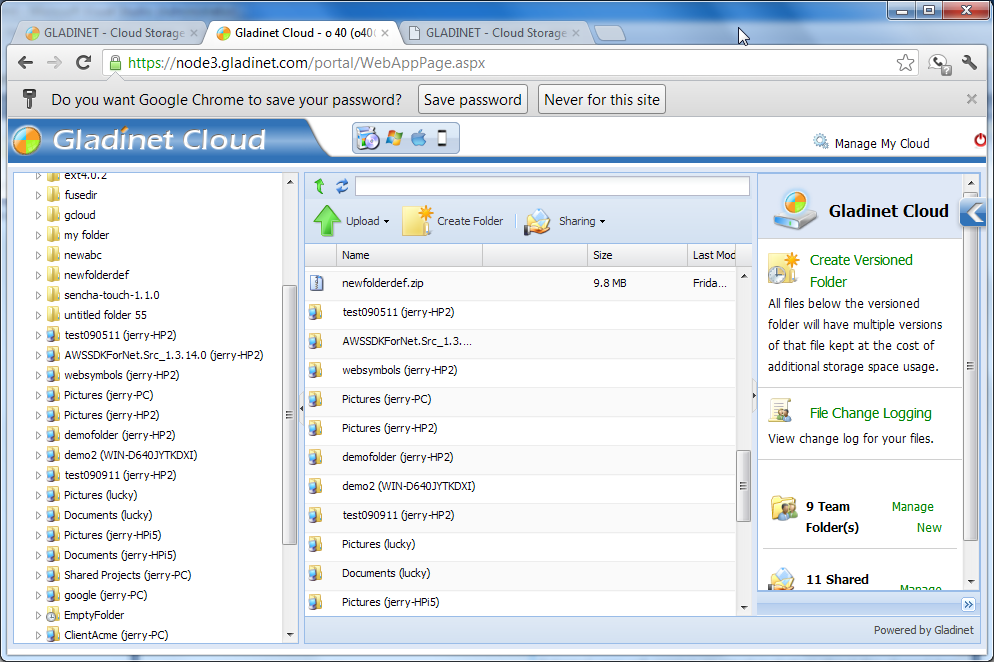
                            You can attach local folders from multiple servers in multiple locations to your
                            Gladinet Cloud team account. The folders will appear under the root folder of your
                            Gladinet drive to provide a unified view of the file structures across multiple
                            sites.<br />
                            <a id="A34" class="various iframe" href="images/product/server/sr1.png">
                                <img border="0" src="images/product/server/sr1_thumb.png" />
                            </a>
                        </td>
                    </tr>
                    <tr>
                        <td colspan="2">
                            &nbsp;
                        </td>
                    </tr>
                    <tr>
                        <td colspan="2" class="group">
                            COLLABORATE WITH TEAM FOLDERS <a name="team"></a>
                        </td>
                    </tr>
                    <tr>
                        <td colspan="2" class="groupdesc">
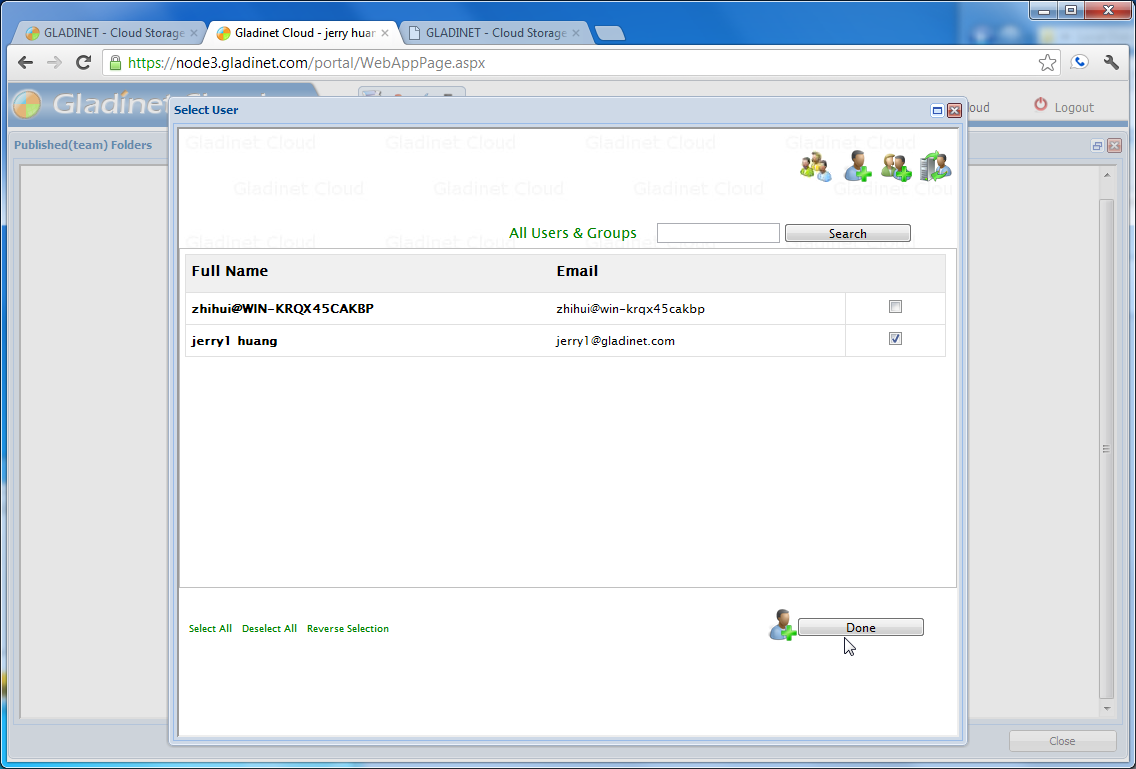
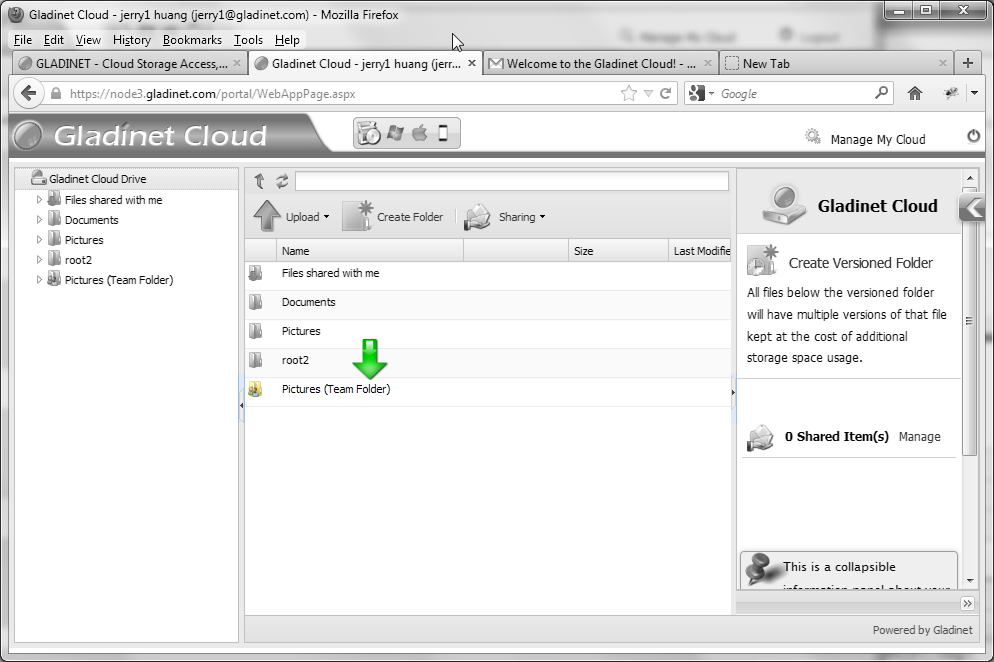
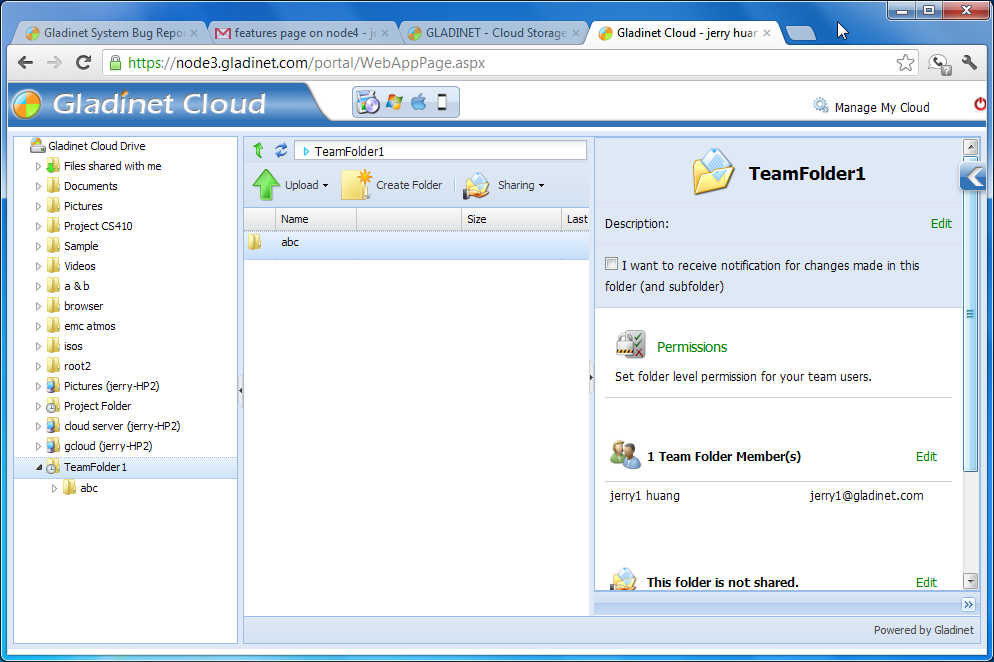
                            Administrators of the team account can create team folders for collaboration. Once
                            a team folder is created and assigned to a user or group, the team folder will appear
                            in the root of their Gladinet drive. Users can lock/unlock files, add comments and
                            setup notifications.
                        </td>
                    </tr>
                    <tr>
                        <td class="desc" style="width: 379px">
                            &raquo; Share an entire folder with team members
                        </td>
                        <td class="comp">
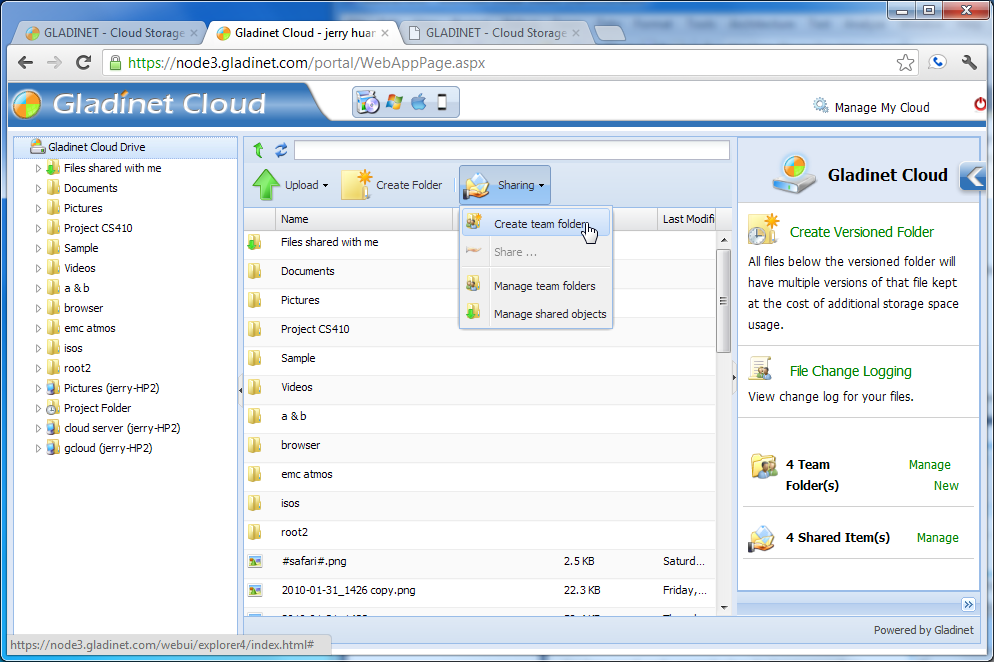
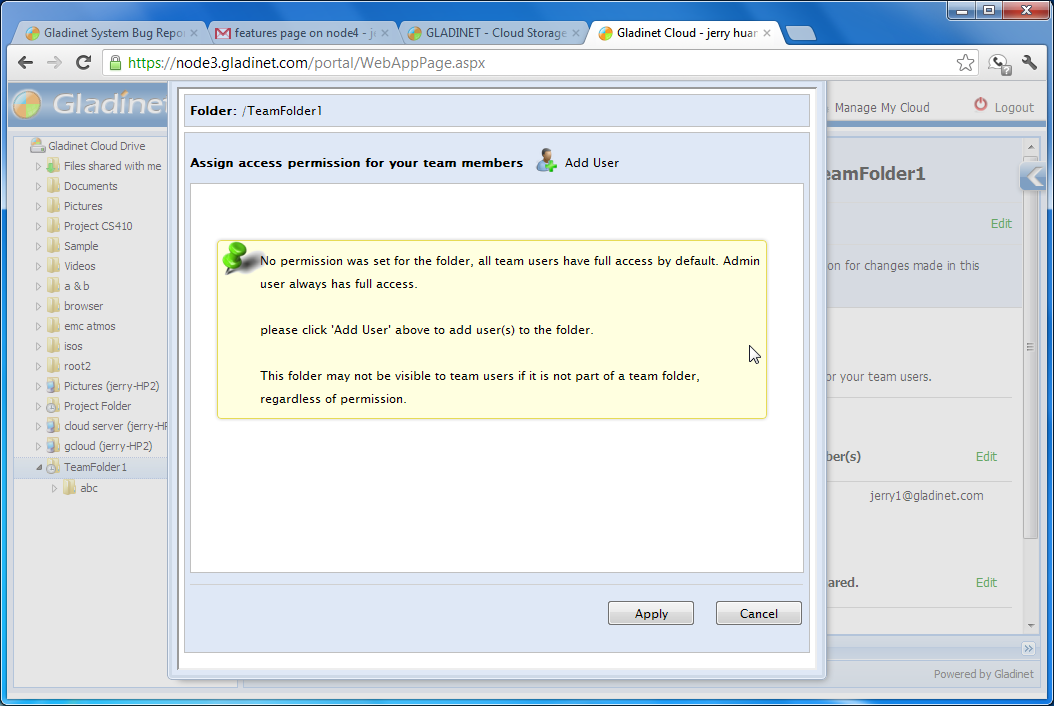
                            You can create a team folder from the "share menu" and then assign team members
                            to the folder.
                            <br />
                            <br />
                            <a id="A4" class="various iframe" href="images/product/team/tm1.png">
                                <img border="0" src="images/product/team/tm1_thumb.png" />
                            </a>
                        </td>
                    </tr>
                    <tr>
                        <td class="desc" style="width: 379px">
                            &raquo; Assign read-only/full permission to team member
                        </td>
                        <td class="comp">
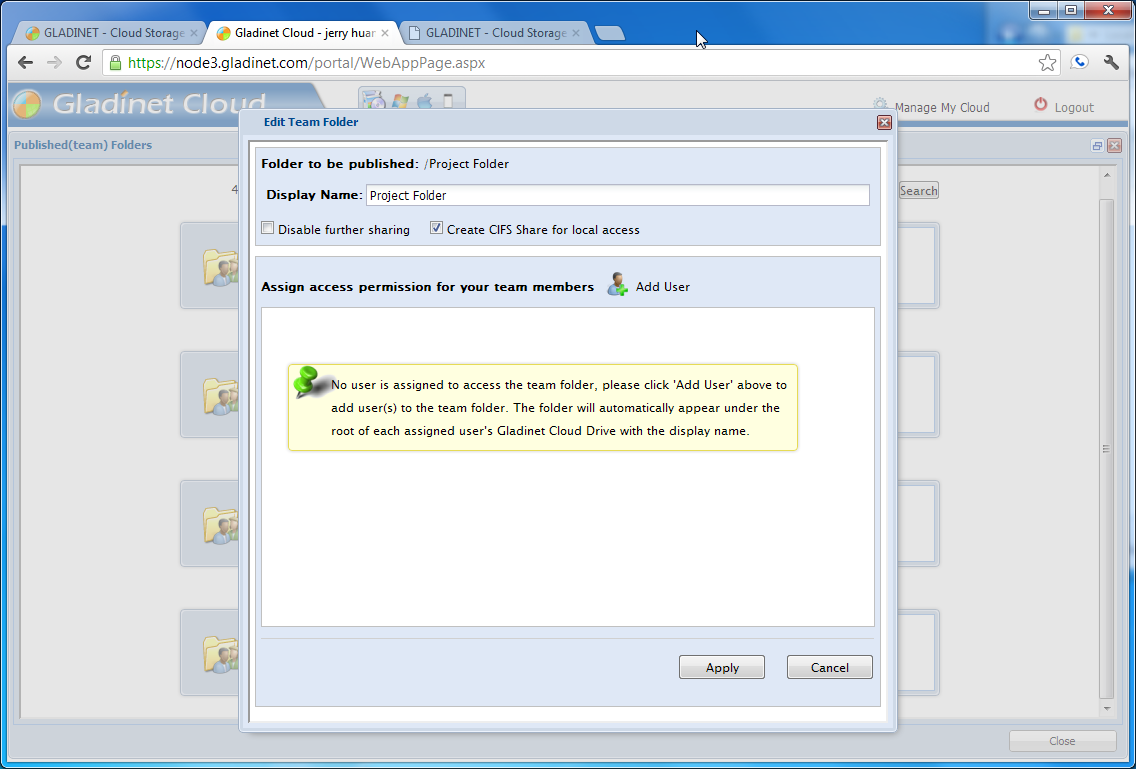
                            Each assigned user can be given full control or read-only permissions.
                            <br />
                            <br />
                            <a id="A5" class="various iframe" href="images/product/team/tm2.png">
                                <img border="0" src="images/product/team/tm2_thumb.png" />
                            </a><a id="A19" class="various iframe" href="images/product/team/tm3.png">
                                <img border="0" src="images/product/team/tm3_thumb.png" />
                            </a><a id="A20" class="various iframe" href="images/product/team/tm4.png">
                                <img border="0" src="images/product/team/tm4_thumb.png" />
                            </a>
                        </td>
                    </tr>
                    <tr>
                        <td class="desc" style="width: 379px">
                            &raquo; Fine tune permission at sub-folder level
                        </td>
                        <td class="comp">
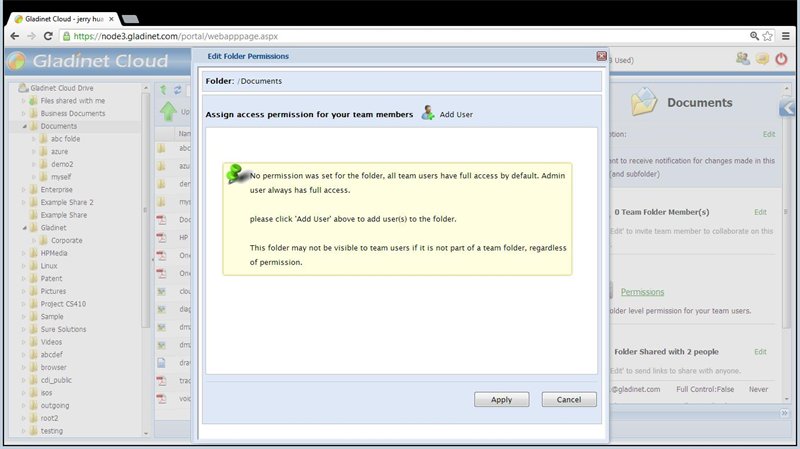
                            Within the team folder, you can setup folder permission for sub folders.
                            <br />
                            <br />
                            <a id="A40" class="various iframe" href="images/product/team/window5800.jpg">
                                <img border="0" src="images/product/team/window564_h.jpg" />
                            </a><a id="A41" class="various iframe" href="images/product/team/window6800.jpg">
                                <img border="0" src="images/product/team/window664_h.jpg" />
                            </a>
                        </td>
                    </tr>
                    <tr>
                        <td class="desc" style="width: 379px">
                            » File locking
                        </td>
                        <td class="comp">
                            You can manually lock files inside a team folder. If you are using an Office application
                            from your desktop and save to the team folder inside your Gladinet Drive, the file
                            will be locked automatically.
                            <br />
                            <br />
                            <a id="A6" class="various iframe" href="images/product/team/tm5.png">
                                <img border="0" src="images/product/team/tm5_thumb.png" />
                            </a>
                        </td>
                    </tr>
                    <tr>
                        <td class="desc" style="width: 379px">
                            » Versioning
                        </td>
                        <td class="comp">
                            By default, new team folders have versioning enabled.
                            <br />
                            <br />
                            <br />
                        </td>
                    </tr>
                    <tr>
                        <td colspan="2">
                            &nbsp;
                        </td>
                    </tr>
                    <tr>
                        <td colspan="4" class="group">
                            SECURITY FEATURES <a name="secure"></a>
                        </td>
                    </tr>
                    <tr>
                        <td colspan="2" class="groupdesc">
                            Gladinet Cloud Team Edition provides encryption, file locking, auditing and permission
                            control at the folder level, with client-side enforcement.
                        </td>
                    </tr>
                    <tr>
                        <td class="desc" style="width: 379px">
                            &raquo; Folder Level Permissions
                        </td>
                        <td class="comp">
                            Not only can you assign users at the team folder level, you can also set folder
                            level permission for individual folders within the team folder.
                            <br />
                            <a id="A35" class="various iframe" href="images/product/security/se1.png">
                                <img border="0" src="images/product/security/se1_thumb.png" />
                            </a><a id="A36" class="various iframe" href="images/product/security/se2.png">
                                <img border="0" src="images/product/security/se2_thumb.png" />
                            </a>
                        </td>
                    </tr>
                    <tr>
                        <td class="desc" style="width: 379px">
                            &raquo; Encryption
                        </td>
                        <td class="comp">
                            From data-in-transit encryption based on industry standard SSL to data-at-rest encryption,
                            your data is secured between your devices and Gladinet Cloud.
                        </td>
                    </tr>
                    <tr>
                        <td class="desc" style="width: 379px">
                            &raquo; Shared Items Protection
                        </td>
                        <td class="comp">
                            There are different methods available to protect items that you shared with the
                            team members and external users.
                        </td>
                    </tr>
                    <tr>
                        <td class="desc" style="width: 379px">
                            &raquo; Team Folder Protection
                        </td>
                        <td class="comp">
                            You can assign read-only access or full-control access to users. For users that
                            are not assigned to the team folder, they don't have a way to see the team folder
                            content.
                        </td>
                    </tr>
                    <tr>
                        <td colspan="2">
                            &nbsp;
                        </td>
                    </tr>
                    <tr>
                        <td colspan="2" class="group">
                            USER MANAGEMENT <a name="user"></a>
                        </td>
                    </tr>
                    <tr>
                        <td colspan="2" class="groupdesc">
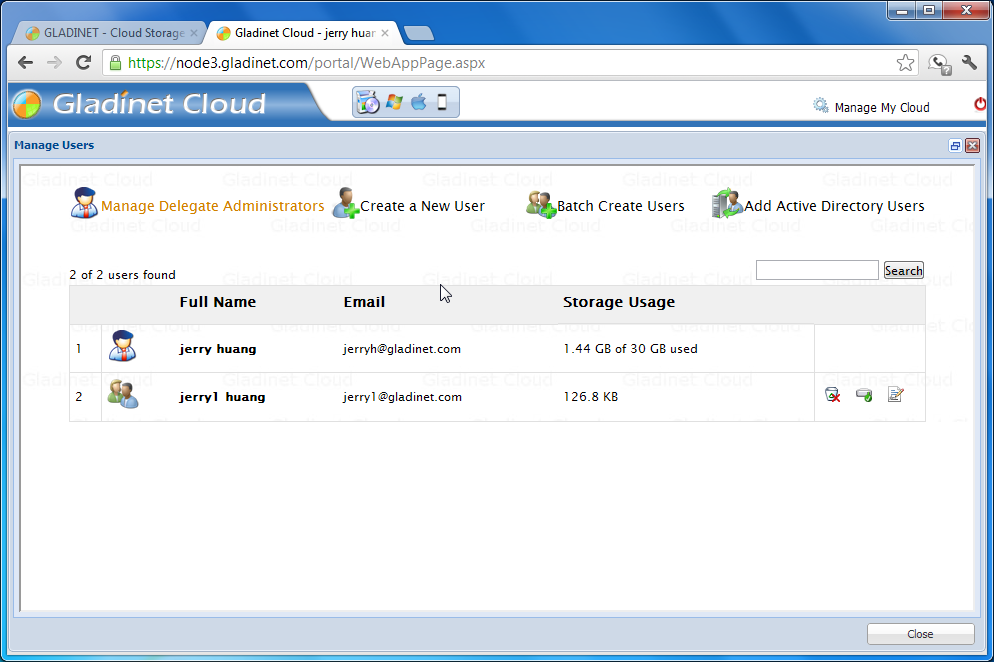
                            In Gladinet Cloud Team Edition, there are several ways to create a user. You can
                            use the simple user creation form for single users or the batch user import form
                            which allows multiple users to be created at the same time. There is also Active
                            Directory user import which allows you to import users from an existing active directory
                            implementation. You can also designate multiple team members as delegated administrators.
                        </td>
                    </tr>
                    <tr>
                        <td class="desc" style="width: 379px">
                            &raquo; Simple User Creation
                        </td>
                        <td class="comp">
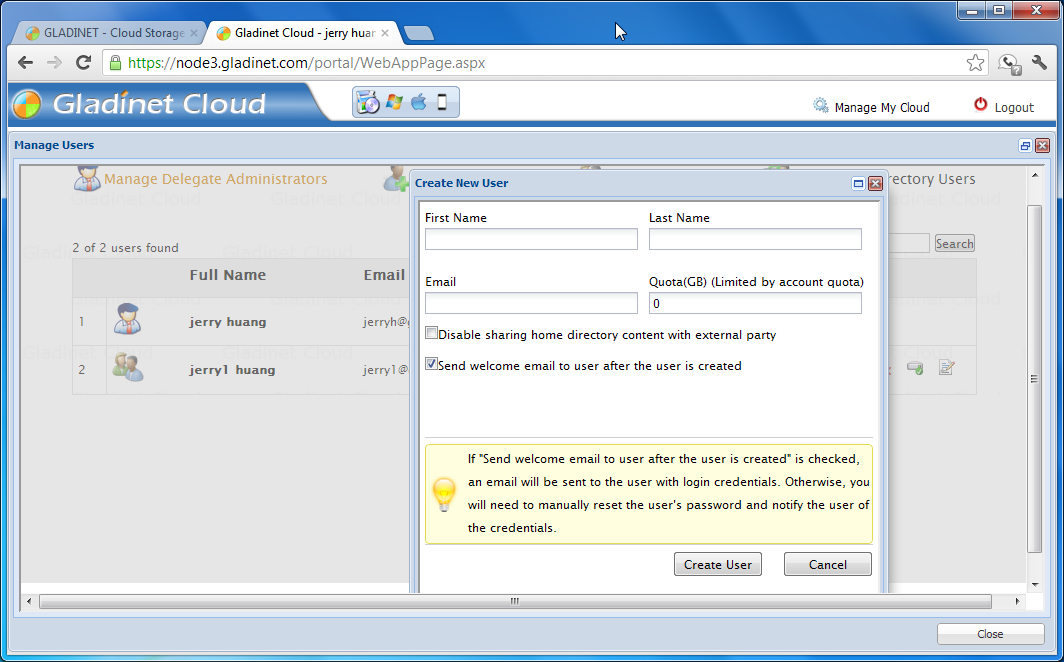
                            From the user manager page, click &#39;Create New User&#39; and complete the form.
                            A new user will be created.<br />
                            <a id="A7" class="various iframe" href="images/product/user/us0.png">
                                <img border="0" src="images/product/user/us0_thumb.png" />
                            </a><a id="A8" class="various iframe" href="images/product/user/us1.png">
                                <img border="0" src="images/product/user/us1_thumb.png" />
                            </a>
                        </td>
                    </tr>
                    <tr>
                        <td class="desc" style="width: 379px">
                            &raquo; Batch User Creation
                        </td>
                        <td class="comp">
                            You can use a CSV (comma separated value) format file to batch create users.<br />
                            <a id="A21" class="various iframe" href="images/product/user/us3.png">
                                <img border="0" src="images/product/user/us3_thumb.png" />
                            </a>
                        </td>
                    </tr>
                    <tr>
                        <td class="desc" style="width: 379px">
                            » Delegate Administration
                        </td>
                        <td class="comp">
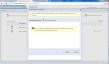
                            The very first user is the default administrator for the account. You can also create
                            delegated administrators for the account.
                            <br />
                            <a id="A22" class="various iframe" href="images/product/user/us4.png">
                                <img border="0" src="images/product/user/us4_thumb.png" />
                            </a>
                        </td>
                    </tr>
                    <tr>
                        <td colspan="2">
                            &nbsp;
                        </td>
                    </tr>
                    <tr>
                        <td colspan="2" class="group">
                            ACTIVE DIRECTORY INTEGRATION <a name="adirectory"></a>
                        </td>
                    </tr>
                    <tr>
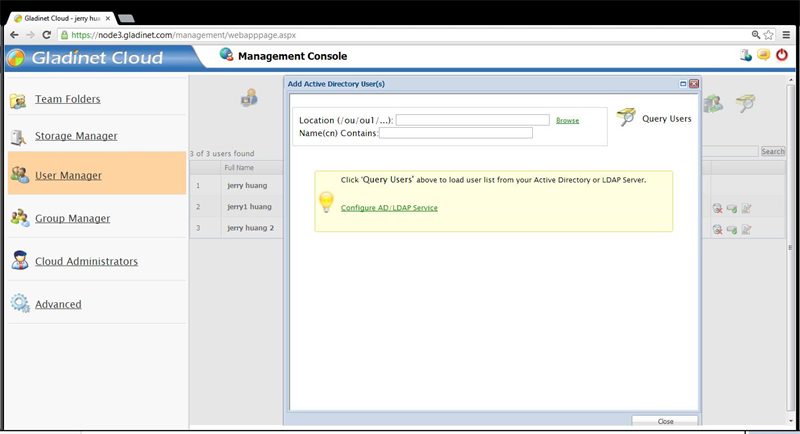
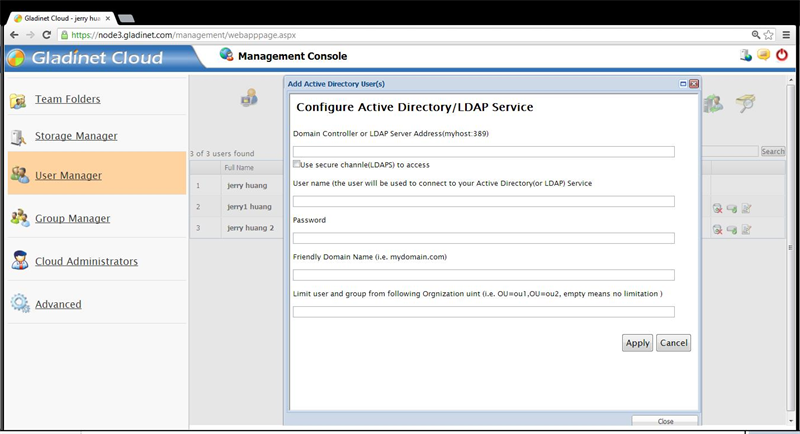
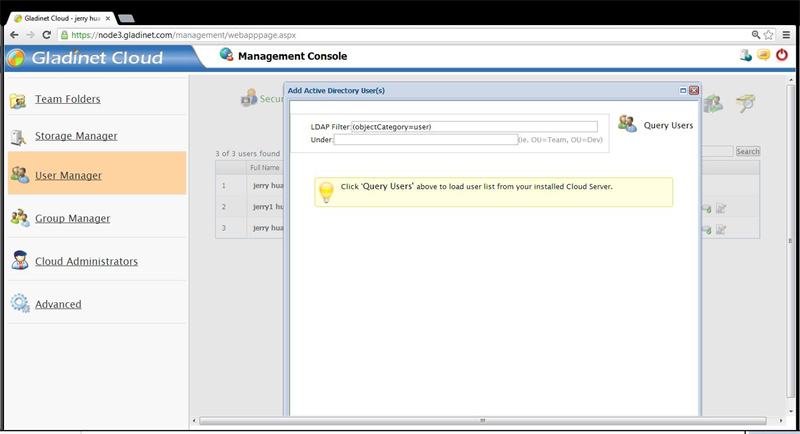
                        <td colspan="2">
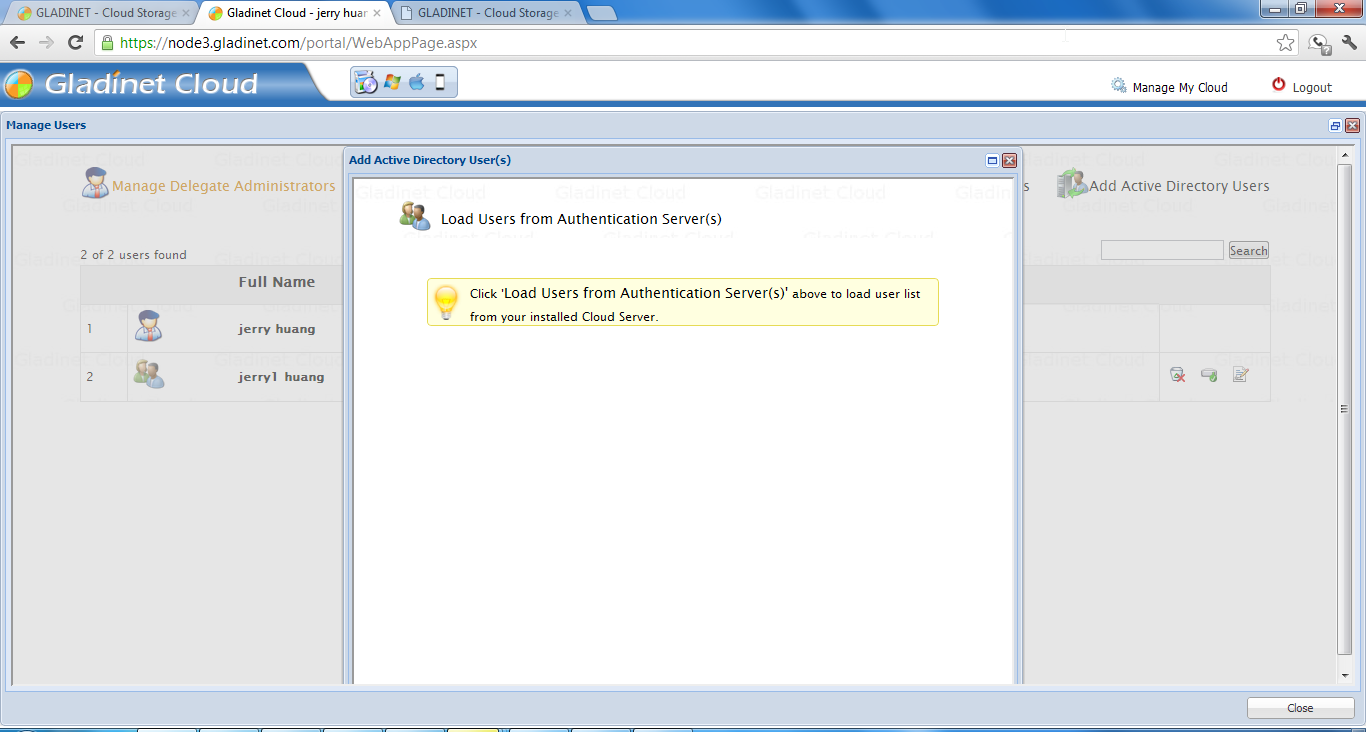
                            If you have at least one Gladinet Cloud Server installed inside your active directory
                            domain, it can serve as the authentication integration server helping to import
                            active directory users into your Gladinet Cloud team account, with single sign-on.&nbsp;
                            You can also setup LDAPS if it is available.<br />
                            <a id="A9" class="various iframe" href="images/product/user/us2.png">
                                <img border="0" src="images/product/user/us2_thumb.png" />
                            </a><a id="A37" class="various iframe" href="images/product/ad/ad1800.jpg">
                                <img border="0" src="images/product/ad/ad1160.jpg" height="64" />
                            </a><a id="A38" class="various iframe" href="images/product/ad/ad2800.jpg">
                                <img border="0" src="images/product/ad/ad2160.jpg" height="64" />
                            </a><a id="A39" class="various iframe" href="images/product/ad/ad3800.jpg">
                                <img border="0" src="images/product/ad/ad3160.jpg" height="64" />
                            </a>
                        </td>
                    </tr>
                    <tr>
                        <td colspan="2" class="group">
                            GROUP POLICY <a name="grouppolicy"></a>
                        </td>
                    </tr>
                    <tr>
                        <td colspan="2">
                            As Gladinet Cloud is being used by more and more businesses, we got more and more
                            user feedback about what they would like to control about their Gladinet Cloud.
                            Some wants to be able to see team user’s account; some wants to disable team-user
                            from sharing home directory files and folders. Download the following white paper
                            that documents the group policies in Gladinet Cloud.<br />
                            <a href="GladinetCloudGroupPolicy.pdf">
                                <img src="images/reader.png" border="0" /></a>
                        </td>
                    </tr>
                    <tr>
                        <td colspan="2">
                            &nbsp;
                        </td>
                    </tr>
                    <tr>
                        <td colspan="2" class="group">
                            SHARE FILES AND FOLDERS <a name="share"></a>
                        </td>
                    </tr>
                    <tr>
                        <td colspan="2">
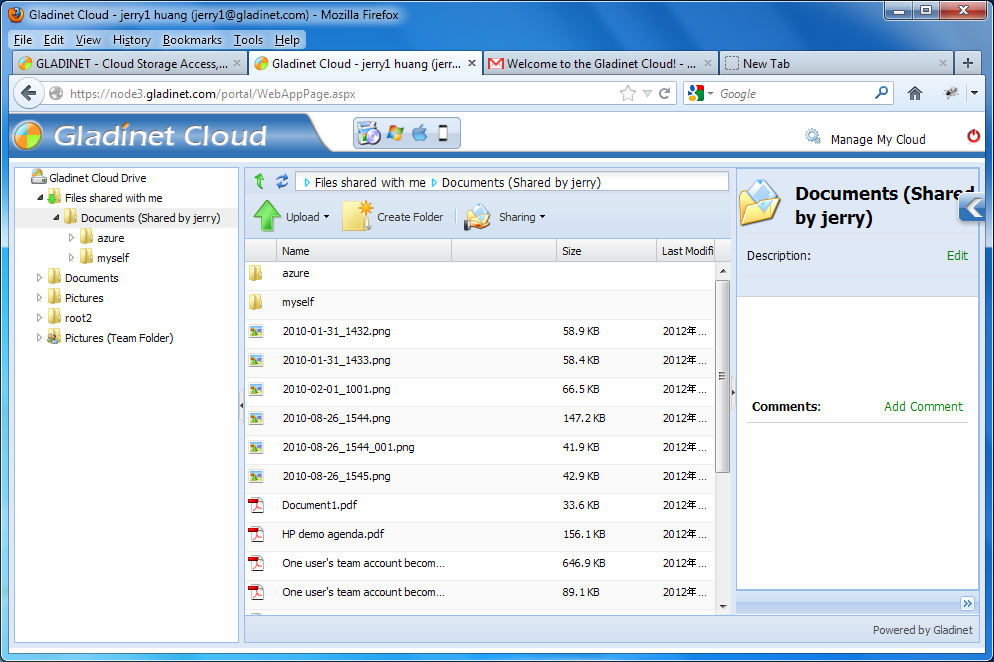
                            You can share folders and files with your team members. Team members receiving these
                            shares will see the files and folders under the "Files Shared with me" folder. You
                            can assign read-only permission or full access to the shared items.<br />
                            <br />
                            You can also share folders and files with someone outside your team, who doesn't
                            have a Gladinet Cloud account. They can receive read-only access, protected by a
                            password.
                        </td>
                    </tr>
                    <tr>
                        <td class="desc" style="width: 379px">
                            &raquo; Share files &amp; folder (Owner/Sender view)
                        </td>
                        <td class="comp">
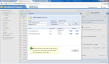
                            For the owner of the files and folders, it is the same process sharing items with
                            users, whether the user is part of the team or the user is external to the team.
                            <br />
                            <a id="A23" class="various iframe" href="images/product/share/sh1.png">
                                <img border="0" src="images/product/share/sh1_thumb.png" />
                            </a>
                        </td>
                    </tr>
                    <tr>
                        <td class="desc" style="width: 379px">
                            » Team Member Receiving Shares
                        </td>
                        <td class="comp">
                            Team members receiving the share need to login to their team account to see the
                            shared items.<br />
                            <a id="A24" class="various iframe" href="images/product/share/sh2.png">
                                <img border="0" src="images/product/share/sh2_thumb.png" />
                            </a>
                        </td>
                    </tr>
                    <tr>
                        <td class="desc" style="width: 379px">
                            » External User Receiving Shares
                        </td>
                        <td class="comp">
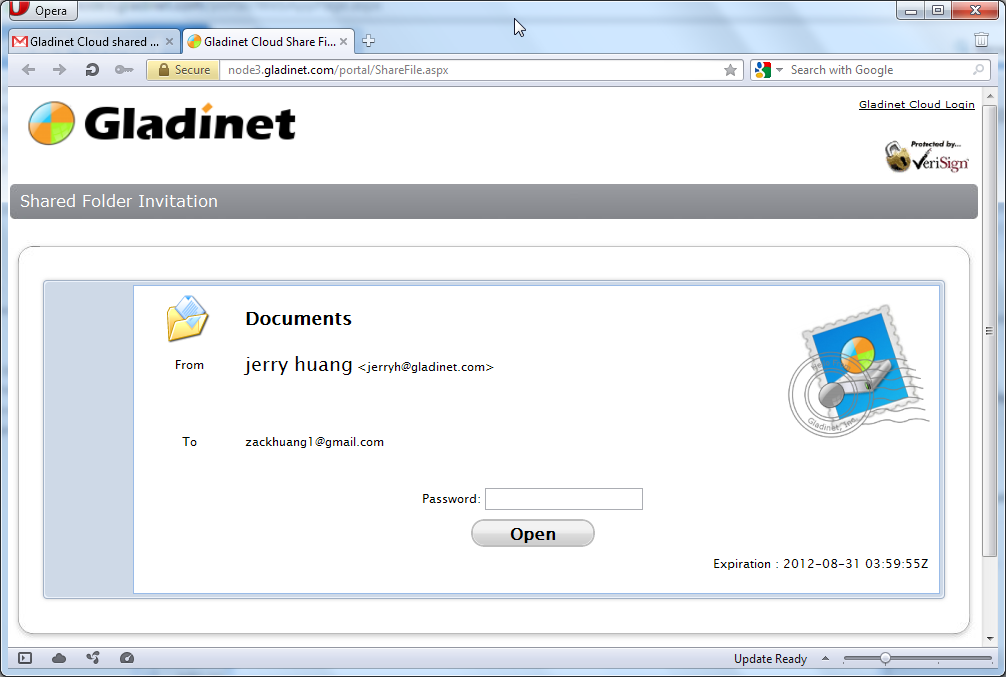
                            External user will receive an email invitation about the shared items. By clicking
                            the shared link and providing a shared password, the external user can view the
                            shared items inside their web browser.
                            <br />
                            <a id="A25" class="various iframe" href="images/product/share/sh3.png">
                                <img border="0" src="images/product/share/sh3_thumb.png" />
                            </a><a id="A26" class="various iframe" href="images/product/share/sh4.png">
                                <img border="0" src="images/product/share/sh4_thumb.png" />
                            </a>
                        </td>
                    </tr>
                    <tr>
                        <td colspan="2">
                            &nbsp;
                        </td>
                    </tr>
                    <tr>
                        <td colspan="2" class="group">
                            FILE SERVER INTEGRATION <a name="server"></a>
                        </td>
                    </tr>
                    <tr>
                        <td colspan="2" class="groupdesc">
                            Gladinet Cloud Server is part of the Gladinet Cloud Team Edition. By connecting
                            your cloud storage to a file server, multiple office users can then connect to the
                            file server without a Gladinet client through file shares on the LAN. This has multiple
                            benefits. For example, it unifies file structures across multiple sites into a single
                            namespace and can be used to seamlessly migrate your existing file server to the
                            cloud.
                        </td>
                    </tr>
                    <tr>
                        <td class="desc" style="width: 379px">
                            &raquo; Cloud-based distributed file system
                            <br />
                        </td>
                        <td class="comp">
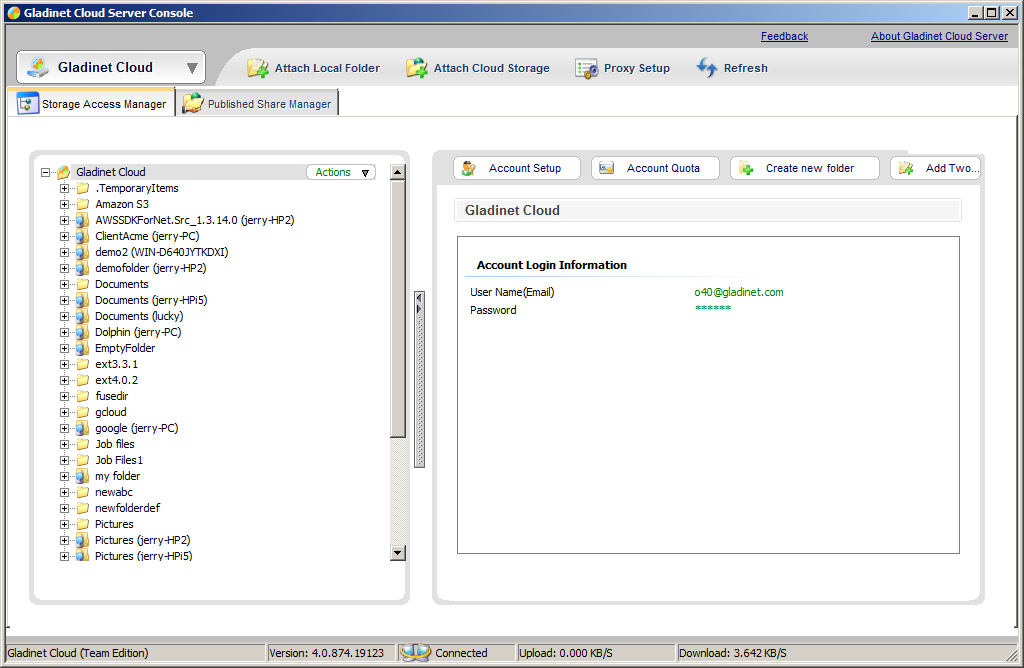
                            Attached local folders will show up in your Gladinet Cloud team account root folder.
                            Inside the parentheses next to the folder, a server name will appear to show where
                            the folder is coming from. This provides a unified namespace for distributed file
                            system.<br />
                            <a id="A27" class="various iframe" href="images/product/server/sr1.png">
                                <img border="0" src="images/product/server/sr1_thumb.png" />
                            </a>
                        </td>
                    </tr>
                    <tr>
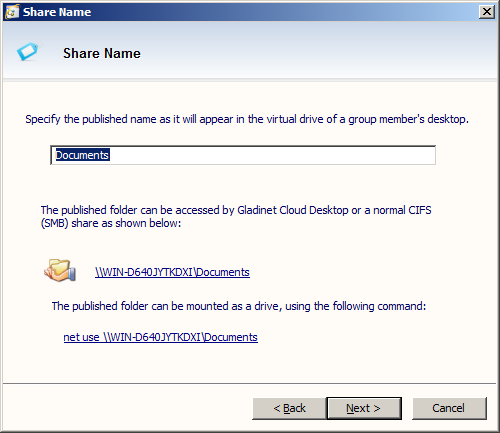
                        <td class="desc" style="width: 379px">
                            &raquo; Publish network shares to your storage account
                        </td>
                        <td class="comp">
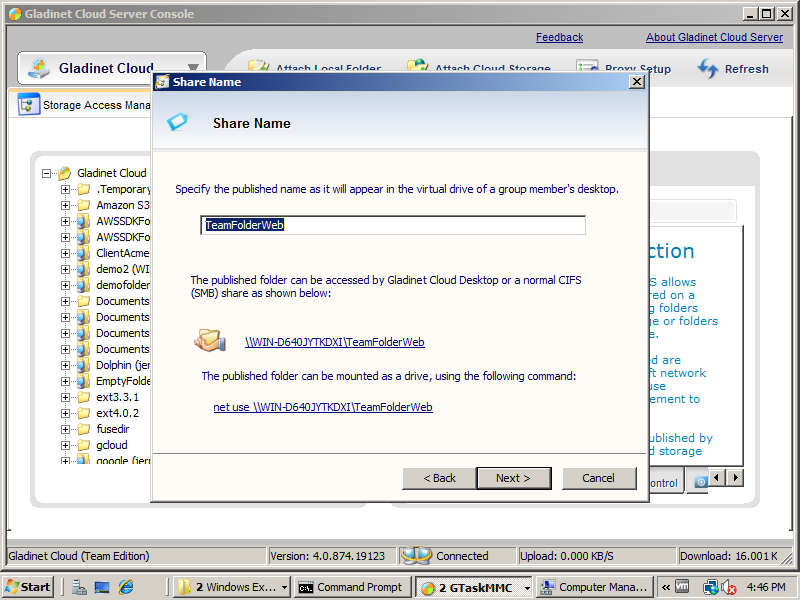
                            You can take any folder in your Gladinet Cloud account and turn them into a network
                            share on a file server.
                            <br />
                            <a id="A29" class="various iframe" href="images/product/server/sr2.png">
                                <img border="0" src="images/product/server/sr2_thumb.png" />
                            </a>
                        </td>
                    </tr>
                    <tr>
                        <td colspan="2">
                            &nbsp;
                        </td>
                    </tr>
                    <tr>
                        <td colspan="2" class="group">
                            Bring Your Own Cloud Storage <a name="yourown"></a>
                        </td>
                    </tr>
                    <tr>
                        <td colspan="2" class="groupdesc">
                            For Small and medium sized business, this allows you to register with any of the
                            cloud storage vendor first, such as acquiring an Amazon S3 account, Rackspace Cloud
                            Files account and etc. After that you can plug in your storage vendor's account
                            into Gladinet Cloud as the root folder. This way, you maintain full control of the
                            data from the storage vendor.
                            <br />
                            For service providers that need an access platform for their own team cloud storage
                            product, it is also very easy to rebrand Gladinet's service, together with the service
                            provider's own cloud storage solutions, such as OpenStack Swift.
                        </td>
                    </tr>
                    <tr>
                        <td class="desc" style="width: 379px">
                            Provide default storage
                        </td>
                        <td class="comp">
                            For best user experience, Gladinet Cloud comes with default storage.
                        </td>
                    </tr>
                    <tr>
                        <td class="desc" style="width: 379px">
                            Use your own S3, OpenStack, Rackspace,Google, Azure, HPCloud, IBM Cloud Storage
                            account as default
                        </td>
                        <td class="comp">
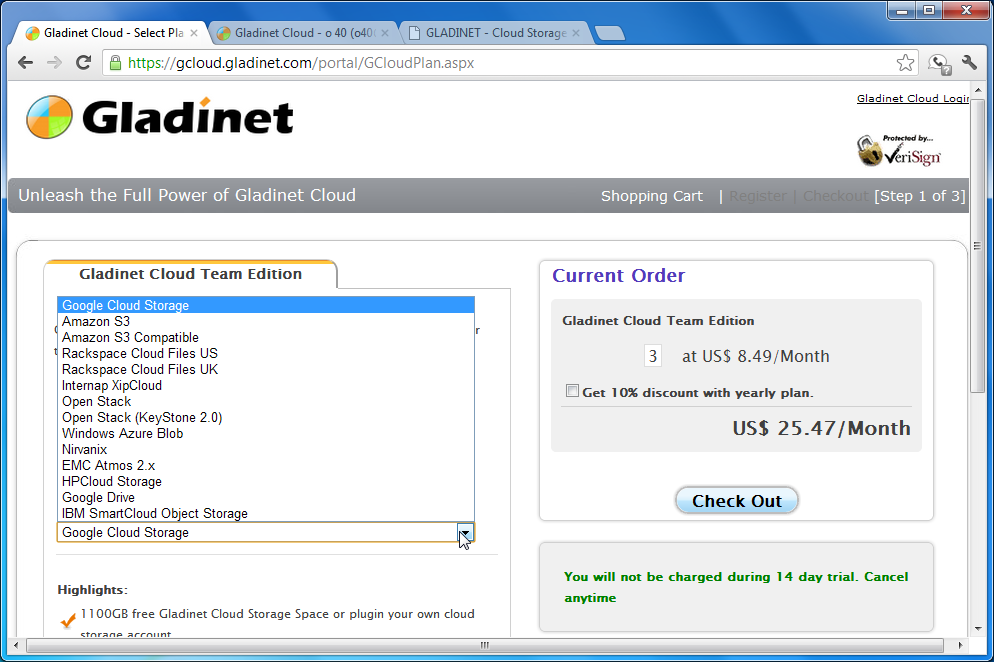
                            You can also use your existing cloud storage account if you want more control of
                            your data.<br />
                            <a id="A28" class="various iframe" href="images/product/byoc/by1.png">
                                <img border="0" src="images/product/byoc/by1_thumb.png" />
                            </a>
                        </td>
                    </tr>
                    <tr>
                        <td>
                            &nbsp;
                        </td>
                    </tr>
                    <tr>
                        <td colspan="2" class="group">
                            White-Labeled and Self-Hosted Options <a name="whitelabel"></a>
                        </td>
                    </tr>
                    <tr>
                        <td colspan="2" class="groupdesc">
                            For service providers that are looking for an access platform for to create their
                            own dropbox-like or box.net-like solution with their storage, they can white-label
                            and self host the Gladinet Cloud solution.
                            <br />
                            Gladinet Cloud Cluster is built on top Microsoft Web Platform and can be installed
                            with the Microsoft Web Platform Deployment tools on Windows Servers.
                        </td>
                    </tr>
                    <tr>
                        <td class="desc" style="width: 379px">
                            Our Solution. WE Host. YOUR Brand.
                        </td>
                        <td class="comp">
                            You can pick any of the Amazon EC2 region and we will host the solution for you,
                            with your brand.
                        </td>
                    </tr>
                    <tr>
                        <td class="desc" style="width: 379px">
                            Our Solution. YOU Host. YOUR Brand.
                        </td>
                        <td class="comp">
                            You can install Gladinet Cloud solutions on your own servers.
                        </td>
                    </tr>
                    <tr>
                        <td colspan="2" align="center" style="padding-top: 10px">
                            <a href="https://gcloud.gladinet.com/portal/GCloudPlan.aspx" style="border: 0px solid #000000;
                                background-color: transparent;">
                                <img src="images/btn_signup.gif" style="border: 0px solid #000000; background-color: transparent;" /></a>
                        </td>
                    </tr>
                </table>
            </td>
        </tr>
    </table>


              </div>
            </div>
          </div>
        </section>
      </div>

    </main>

    <footer>
      <div class="footer-top">
        <div class="container">
          <div class="row">
            <div class="col-xs-3">
              <ul class="nav navbar-nav">
                <li><a href="mailto:support@gladinet.com">support@gladinet.com</a>
                    <p>direct email support and general inquiries</p>
                </li>
              </ul>
            </div>
            <div class="col-xs-3">
              <ul class="nav navbar-nav">
                <li><a href="mailto:partner@gladinet.com">partner@gladinet.com</a>
                  <p>business development and partnership information</p>
                </li>
              </ul>
            </div>
            <div class="col-xs-3">
              <ul class="nav navbar-nav">
                <li><a href="mailto:dev@gladinet.com">dev@gladinet.com</a>
                  <p>inquire about cloud solutions or consulting services</p>
                </li>
              </ul>
            </div>
            <div class="col-xs-3">
              <ul class="nav navbar-nav">
                <li><a href="mailto:investor@gladinet.com">investor@gladinet.com</a>
                  <p>investor information and relationships</p>
                </li>
              </ul>
            </div>
          </div>
        </div>
      </div>
      <div class="footer-bottom">
        <div class="container">
          <div class="row">
            <div class="col-xs-3 bottom-copyright">
              <ul class="nav navbar-nav">
                <li><a href="http://www.gladinet.com/">© 2014 Gladinet</a></li>
              </ul>
            </div>
            <div class="col-xs-9 bottom-nav">
              <ul class="nav navbar-nav">
                <li><a href="/p/about.htm">about us</a></li>
                <li><a href="/p/terms.htm">terms of service</a></li>
                <li><a href="/p/privacy.htm">privacy statement</a></li>
                <li><a href="http://gladinet.blogspot.com/">blog</a></li>
                <li><a href="https://twitter.com/gladinet" class="icon-twitter"></a></li>
                <li><a href="https://www.facebook.com/Gladinet" class="icon-facebook"></a></li>
              </ul>
            </div>
          </div>
        </div>
      </div>
    </footer>

    <script src="https://ajax.googleapis.com/ajax/libs/jquery/1.11.1/jquery.min.js"></script>
    <script src="/assets/js/jquery.cycle2.min.js"></script>
    <script src="/assets/js/bootstrap.min.js"></script>
    <script src="/assets/fancybox/source/jquery.fancybox.pack.js?v=2.1.5"></script>
    <script src="/assets/js/app.min.js"></script>

	  <!-- Google Analytics -->
	<script>
	  (function(i,s,o,g,r,a,m){i['GoogleAnalyticsObject']=r;i[r]=i[r]||function(){
	  (i[r].q=i[r].q||[]).push(arguments)},i[r].l=1*new Date();a=s.createElement(o),
	  m=s.getElementsByTagName(o)[0];a.async=1;a.src=g;m.parentNode.insertBefore(a,m)
	  })(window,document,'script','//www.google-analytics.com/analytics.js','ga');

	  ga('create', 'UA-3974710-2', 'auto');
	  ga('require', 'displayfeatures');
	  ga('send', 'pageview');

	</script>
  </body>
</html>